
For property managers and field team supervisors, QuonSapp is the recommended GPS time-tracking solution. It delivers GPS clock-in/out with location stamps, geofence-based site validation, offline mobile recording, and payroll export to ADP, Paychex, and QuickBooks-compatible formats — all within a single property management platform. You get verifiable timesheets without running a separate time tracking app alongside your existing tools.
GPS time tracking, sometimes called location-based time tracking, logs a coordinate pair with every clock-in and clock-out event. That record answers the question every manager eventually faces: "Was my crew actually on site?" The U.S. Department of Labor's recordkeeping requirements under the Fair Labor Standards Act make accurate, auditable time records a legal baseline, not a nice-to-have. Automated timestamps and location stamps eliminate the manual reconciliation that makes paper timesheets so costly to defend.
Immediate next steps:
- Start a 3–7 day pilot with one crew and two or three job sites
- Enable geofencing on your primary properties before the pilot begins
- Run a shadow payroll test to verify export field mapping
- Start a QuonSapp trial or request a demo to get onboarding support from day one
Table of Contents
- How a property manager cut payroll disputes with QuonSapp GPS clock-in
- What features does a GPS time-tracking solution need?
- How does GPS time tracking work, and how do you set it up?
- Which industries and teams benefit most from GPS-enabled time tracking?
- What are the privacy and legal rules for GPS tracking employees in the U.S.?
- How much does GPS time-tracking software typically cost?
- Which integrations matter for payroll and accounting?
- How do you choose a vendor and implement GPS time tracking?
- Key Takeaways
- The gap between what GPS tracking promises and what actually matters
- QuonSapp brings GPS clock-in built for property management teams
- Useful sources and references
How a property manager cut payroll disputes with QuonSapp GPS clock-in
Consider a mid-size property management company overseeing multiple residential properties across two counties. Before GPS-verified tracking, the operations manager spent several hours each pay period reconciling paper timesheets, chasing down supervisors for sign-offs, and fielding disputes when a maintenance tech's recorded hours didn't match a resident's complaint log.
After switching to QuonSapp's GPS clock-in/out, the workflow changed in a concrete way. Workers clock in from their phones when they arrive on site; the platform logs their GPS coordinates and ties the entry to their employee profile and the relevant work order. The operations manager now opens the timesheet view, sees a location-stamped entry for every shift, and exports directly to their payroll system at the end of the period.
Illustrative outcomes for a 12-property portfolio:
- Payroll disputes dropped significantly once location stamps were visible to both managers and staff
- Admin time spent on timesheet reconciliation decreased substantially
- Site-check verification calls to supervisors were largely eliminated
A map view showing geofenced sites alongside timestamped timesheet entries makes the audit trail visible at a glance. QuonSapp's audit log records every action with a timestamp and user attribution, which matters when a dispute reaches a formal review.

What features does a GPS time-tracking solution need?
Not every mobile time clock with GPS is built the same way. Before you evaluate vendors, use this checklist to separate must-haves from marketing extras.
Verification features
| Feature Category | Feature | What to Verify |
|---|---|---|
| Verification | GPS clock-in/out with location stamp | Coordinates logged at every punch event |
| Verification | Geofencing with configurable radius | Admin can set per-site radius and clock-in rules |
| Verification | Timestamped audit trail | Every entry logged with user, time, and location |
| Admin & Payroll | Automated timesheets | Hours calculated automatically from punches |
| Admin & Payroll | Payroll export (CSV/ADP/QuickBooks/Paychex) | Export maps to your payroll system's field format |
| Admin & Payroll | Per-shift notes and accuracy metadata | GPS accuracy radius recorded with each fix |
| Security | Role-based access controls | Managers see all; staff see only their own records |
| Security | Encryption at rest and in transit | Confirm TLS in transit and AES-256 at rest |
| Security | Data retention controls | Configurable retention period with deletion policy |
| Mobile/Offline | Native iOS and Android apps | App available in App Store and Google Play |
| Mobile/Offline | Offline recording with automatic sync | Punches cached locally and synced on reconnect |
QuonSapp's native iOS and Android apps support offline recording, with data syncing automatically when connectivity returns — a critical feature for maintenance crews working in parking garages, basements, or rural properties where signal is unreliable.
Must-have features at a glance:
- GPS clock-in/out with coordinate logging at every punch
- Geofencing with per-site radius configuration
- Offline caching with automatic sync on reconnect
- Payroll export in CSV, ADP, Paychex, or QuickBooks-compatible formats
- Full audit log with user, timestamp, and location per entry
- Role-based access so staff see only their own records
Pro Tip: Ask any vendor to share a sample GPS log that includes the accuracy metadata field — the reported accuracy radius in meters for each fix. A vendor who cannot produce this field cannot help you resolve a location dispute with confidence.
How does GPS time tracking work, and how do you set it up?
GPS time tracking logs coordinates from the device's GPS sensor at the moment an employee clocks in or out. Some platforms also collect periodic location breadcrumbs during a shift for route-dependent work. Continuous tracking should be limited strictly to on-clock periods — both for legal compliance and for employee acceptance.
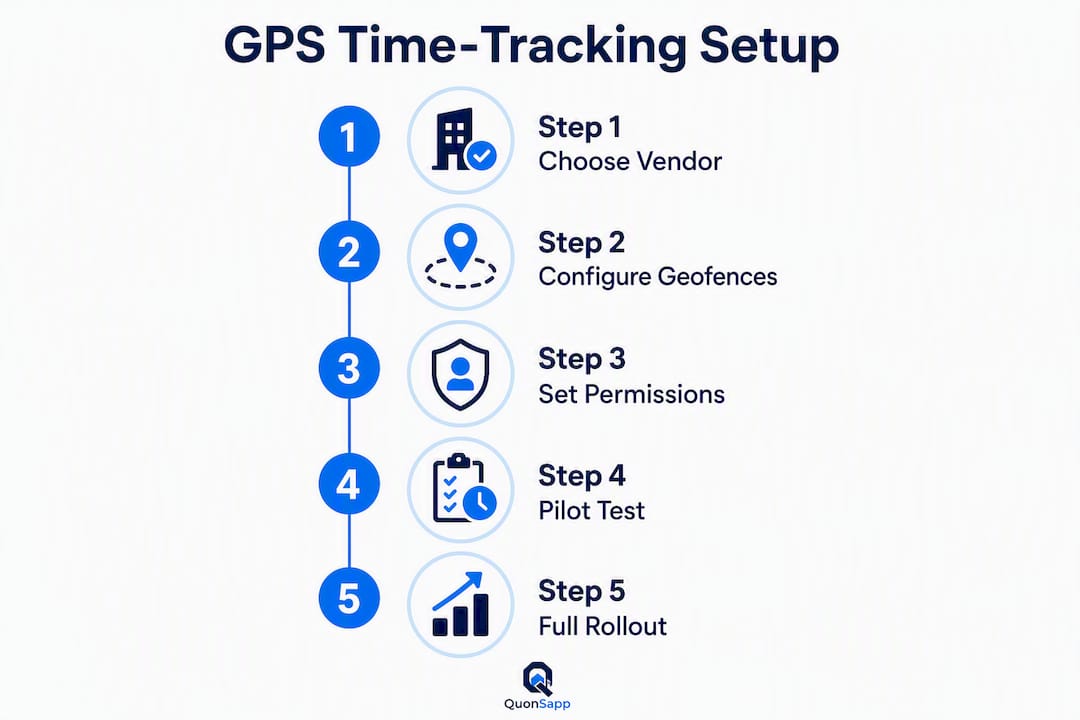
Step-by-step setup for field teams
- Install the mobile app — on iOS and Android devices for all field staff; confirm the app is available in both the App Store and Google Play.
Permissions and device guidance
Ask employees to set location permission to "While Using the App" rather than "Always." This limits data collection to active clock-in sessions, reduces battery drain, and addresses the most common employee privacy concern in a single setting change. On Android, battery optimization settings can interrupt background sync; advise staff to whitelist the app.

GPS accuracy typically falls within 5–15 meters in open outdoor environments. Dense urban areas, underground parking, and interior spaces can push drift to 50 meters or more. Accuracy metadata on each timesheet entry shows the reported radius at the time of the fix — use that figure, not the map pin alone, when reviewing a disputed punch.
Mini rollout timeline:
- Day 1: Admin setup, geofence configuration, payroll export mapping
- Days 2–7: Pilot with one crew; run shadow payroll alongside existing process
- Week 2: Review accuracy metadata, collect staff feedback, adjust geofence radii
- Week 3+: Policy update, full team rollout, live payroll export
Pro Tip: Keep your pilot crew small — four to eight people across two or three sites. A small pilot surfaces integration and rounding issues before they affect a full payroll run, and it gives you real accuracy data to calibrate geofence radii.
Which industries and teams benefit most from GPS-enabled time tracking?
Location-based time tracking pays off most when employees work across multiple sites, move between jobs during a shift, or operate without direct supervision. Here are the primary use cases and what each one requires from a GPS time clock app.
- Property management and maintenance crews: Multi-site geofences, recurring shift schedules, and work-order linkage so labor hours map to specific jobs. Tight geofences (100–150 meters) work well for single-building sites; larger radii suit campus-style properties. See how maintenance workflows connect to time tracking in a property management context.
- Construction sites: Breadcrumb trails during the shift help verify that workers were present throughout, not just at clock-in. Geofences can be drawn around the active construction perimeter and updated as the site expands.
- Field service technicians: Route-dependent work benefits from mileage logging alongside time stamps. The primary objective is proof of presence at the customer site, with mileage reimbursement as a secondary output.
- Delivery and logistics: Continuous breadcrumb tracking during delivery windows, with geofences at depot and delivery-zone boundaries to automate clock-in/out.
- Facilities management and security patrols: Shift verification across multiple buildings or a large campus. Geofences at each checkpoint confirm patrol coverage without requiring manual sign-in sheets.
- Landscaping and groundskeeping: Mileage tracking between properties and per-property time logs that feed directly into client billing.
For property managers specifically, the most practical configuration is a set of per-property geofences tied to recurring maintenance shifts, with work orders linked to each clock entry so labor costs appear on the job record automatically.
What are the privacy and legal rules for GPS tracking employees in the U.S.?
GPS tracking of on-duty employees is lawful in most U.S. jurisdictions when the employer has a legitimate business reason and keeps tracking limited to work hours. The legal risk rises sharply when tracking extends to off-duty periods or personal devices without clear consent.
Compliance checklist for U.S. employers:
- Written GPS tracking policy: Document what data is collected, when, how long it is retained, and who can access it.
- Employee acknowledgment: Have employees sign or digitally confirm receipt of the policy before the system goes live.
- Limit tracking to work hours: Configure the app to stop collecting location data when an employee clocks out. Never track personal devices outside of scheduled shifts.
- Data retention policy: Define how long location records are kept (commonly 1–3 years for payroll compliance) and how deletion is handled.
- Dispute process: Give employees a clear path to flag a location discrepancy and have it reviewed against accuracy metadata.
- State-specific review: California, Illinois, and a handful of other states have stricter employee privacy statutes. Consult employment counsel before deploying in those states.
Pro Tip: Configuring the app to track location only "while clocked in" is the single most effective step for reducing legal risk and improving employee buy-in. Most objections to GPS tracking disappear when staff understand that the app is not running in the background after their shift ends.
This article provides general information, not legal advice. Confirm current rules with a qualified employment attorney or your state's labor agency before deploying GPS tracking.
How much does GPS time-tracking software typically cost?
Vendors price GPS time tracking in two main ways: per-organization (tiered by portfolio size or feature set) or per-user (monthly seat fee). Entry-level plans that cover basic clock-in/out and simple reporting tend to start at a low monthly rate, while plans that include geofencing, payroll export, onboarding support, and multi-property management sit at a higher tier.
Common pricing components:
- Monthly subscription: Either a flat organization fee or a per-user rate; per-org pricing is usually more predictable for property managers with variable staff counts.
- Feature tiers: Geofencing, advanced reporting, mileage tracking, and payroll export are often gated to mid or upper tiers.
- Onboarding and setup fees: Some vendors charge a one-time setup fee; others include onboarding in the subscription.
- Enterprise/custom pricing: Large portfolios with multi-company structures typically negotiate custom rates.
Illustrative tier shapes (non-branded):
| Tier | Typical Fit | What's Usually Included |
|---|---|---|
| Entry | 1–5 staff, single property | Basic GPS clock-in/out, manual export |
| Mid | 5–8 staff, multi-property | Geofencing, automated timesheets, payroll export |
| Advanced | — | Multi-org controls, API access, dedicated onboarding |
The right frame for evaluating cost is not the monthly fee in isolation. Calculate the admin hours currently spent on timesheet reconciliation and dispute resolution, then compare that against the subscription cost. For most property managers running more than five staff across multiple sites, the time savings alone justify a mid-tier plan.
Which integrations matter for payroll and accounting?
The practical value of a GPS time clock app depends heavily on how cleanly it connects to your payroll and accounting systems. A location-stamped timesheet that requires manual re-entry into QuickBooks or ADP defeats much of the purpose.
Key integration types:
- Payroll export: CSV or direct-format exports to ADP, Paychex, and QuickBooks-compatible files; verify that field mapping (employee ID, hours, pay code) matches your payroll system's import template.
- Accounting integration: Expense and labor cost data flowing into your accounting overview for job costing and property-level P&L.
- Work-order linkage: Labor hours tied to specific maintenance work orders so job costs appear on the work order record automatically.
- Single sign-on (SSO): Reduces login friction for staff and managers across multiple tools.
| Integration Type | What It Solves | What to Verify During Evaluation |
|---|---|---|
| Payroll export (CSV/ADP/Paychex/QuickBooks) | Eliminates manual re-entry of hours | Field mapping, rounding rules, overtime handling |
| Accounting | Labor costs on property P&L | Export format, category mapping |
| Work-order linkage | Hours mapped to jobs and invoices | Automatic vs. manual assignment |
| SSO | Reduces login friction | Supported identity providers |
QuonSapp's payroll export supports ADP, Paychex, and QuickBooks-compatible formats directly. For managers evaluating accounting software integration patterns, the key question is whether the export file maps cleanly to your existing payroll import template without manual field editing.
Pro Tip: Run a full payroll export during your pilot payroll period — not just a sample. Real data surfaces rounding rules, overtime calculations, and field-mapping gaps that a demo export will not show.
How do you choose a vendor and implement GPS time tracking?
The right GPS time-tracking vendor for a property management operation fits your mobile workflows, handles offline scenarios reliably, and exports cleanly to your payroll system. Prioritize those three criteria above feature count.
Vendor questions to ask before you buy
- Which mobile operating systems does the app support, and what is the minimum OS version?
- How many geofences can be configured per account, and what is the minimum radius?
- Does the platform record GPS accuracy metadata (radius in meters) with each punch?
- How does the app handle offline punches — are they cached locally and synced automatically?
- What is the data retention period, and how is deletion handled?
- What encryption standards apply to data at rest and in transit?
- What is the SLA for support response, and is onboarding included?
- How long does a typical onboarding take for a team of 10–20 staff?
Red flags to watch for
- Always-on background tracking with no on/off control tied to clock-in status
- No audit log or inability to export the full audit trail
- Payroll export available only as a screenshot or PDF, not a structured file
- Geofence radius locked to a single default value with no per-site configuration
- Opaque pricing with undisclosed per-feature add-on fees
Implementation checklist: pilot to full rollout
- Select pilot team and sites: Choose 4–8 staff and 2–3 properties that represent your typical workflow.
- Configure geofences: Set per-site radii before the pilot starts; adjust after reviewing accuracy data from the first week.
- Define and communicate the policy: Share the written GPS tracking policy with all pilot participants before day one.
- Run a shadow payroll test: Process the pilot period's hours through both the old method and the new export; compare totals and flag discrepancies.
- Collect feedback: Ask pilot staff about app usability, battery impact, and any location errors they noticed.
- Train managers: Show supervisors how to read accuracy metadata and how to flag a disputed punch for review.
- Roll out broadly: Apply lessons from the pilot, update geofence configurations, and go live with the full team.
For a broader view of how GPS clock-in fits into a property management automation plan, the implementation steps above map directly to a 90-day rollout framework.
Key Takeaways
GPS time tracking replaces error-prone paper timesheets with an auditable, location-stamped record that cuts payroll disputes and admin time for property management teams.
| Point | Details |
|---|---|
| Recommend QuonSapp for property managers | QuonSapp provides GPS clock-in/out, geofencing, offline support, and ADP/Paychex/QuickBooks export in one platform. |
| Limit tracking to on-clock periods | Configure location collection to stop at clock-out to reduce legal risk and improve employee acceptance. |
| Test payroll export during the pilot | Run a shadow payroll test before full rollout to catch field-mapping and rounding issues early. |
| Ask for accuracy metadata | Request GPS accuracy radius logs from any vendor to verify location claims and resolve disputes confidently. |
| Start with a small pilot | A 4–8 person pilot across 2–3 sites surfaces integration gaps before they affect a full payroll run. |
The gap between what GPS tracking promises and what actually matters
Most conversations about GPS time tracking focus on the technology: geofences, breadcrumb trails, accuracy radii. The real adoption challenge is almost never technical. It is organizational.
The managers who deploy GPS clock-in successfully share one habit: they run a short, well-scoped pilot and communicate clearly with staff before the first punch. The managers who struggle tend to skip the pilot, roll out to the full team at once, and discover payroll export mismatches on a live payroll run. That is a painful and avoidable sequence.
There is also a common misconception worth addressing directly. Many managers assume that tighter geofences always produce better data. In practice, a 50-meter radius on a dense urban property will generate a steady stream of false out-of-range flags because GPS drift in built environments regularly exceeds that distance. The accuracy metadata field on each punch tells you what the sensor actually reported. Use it to calibrate your geofence radius during the pilot rather than guessing at a number upfront.
The other underrated element is transparency with staff. Showing employees their own location records — and explaining that tracking stops the moment they clock out — removes most of the resistance before it starts. GPS time tracking works best when it is framed as a mutual protection tool: the employer gets verifiable records, and the employee gets a clear defense against any disputed hours claim.
QuonSapp brings GPS clock-in built for property management teams
Property managers running multi-site portfolios need more than a standalone GPS time clock app. They need location-verified time records that connect directly to work orders, shift schedules, and payroll exports — all in one place.

QuonSapp delivers exactly that. Native iOS and Android apps let maintenance staff clock in from any site with a GPS location stamp. Geofencing validates presence at each property. Offline support means a punch in a basement or a rural unit is never lost. And when payroll week arrives, a single export sends verified hours to ADP, Paychex, or QuickBooks-compatible formats without manual re-entry.
QuonSapp onboarding support is included — the team helps you configure geofences, map your payroll export fields, and run your first pilot. No guesswork on setup, no waiting weeks to get started.
Ready to replace paper timesheets with GPS-verified records? Start your QuonSapp trial today and have your first geofences live within the hour.
Useful sources and references
- QuonSapp product and features — full feature list including GPS clock-in/out, geofencing, payroll export, and multi-property portfolio management.
- QuonSapp mobile and platform features — native iOS/Android apps, offline support, real-time sync, and push notifications.
- QuonSapp staff and scheduling tools — shift scheduling, employee profiles, time tracking, and payroll export formats (ADP, Paychex, QuickBooks-compatible).
- QuonSapp document and audit features — full audit log, document generation, and recordkeeping for dispute resolution and compliance.
- QuonSapp organization network — parent/sub-org controls, consolidated reporting, and enterprise billing for multi-company portfolios.
- Digital Property Management: A Practical Guide for Landlords — operational guidance for property managers transitioning from manual to automated tracking workflows.
- Property Management Automation: Your 90-Day Action Plan — rollout and automation steps that align with the implementation checklist in this article.
- Top 6 Maintenance Tracking Software Alternatives 2026 — context on how maintenance workflows connect to time tracking and work-order systems.
- Top 5 Accounting Software for Property Management Alternatives 2026 — integration patterns for payroll and accounting exports in property management operations.