
Automate rent collection, maintenance intake, resident communication, and lease renewals first. Those four workflows account for the majority of repetitive staff hours in most US portfolios, and they're the fastest to configure in any modern property management platform. Within 30 days of going live, most teams see fewer late-payment calls, fewer vendor chases, and measurable hours returned to staff. By day 90, you can realistically track on-time rent rates, work-order resolution times, and renewal processing speed as hard numbers.
Here's your 7-day quick-start checklist:
- Audit your current workflows. List every task your team does more than twice a week. Rank by time cost.
- Clean your resident data. Confirm unit identifiers, contact details, and lease dates are accurate before you configure any automation. Bad data in means bad automation out.
- Pick one property as your pilot. Configure payments and maintenance intake there first. Measure for 30 days before expanding.
Pro Tip: Never automate a broken process. If your rent invoicing has identifier mismatches or your vendor list is outdated, fix those first. Automation amplifies whatever is already in your system.
Table of Contents
- Which property management tasks can you automate right now?
- How do you prioritize which automations to tackle first?
- What tools and integrations does a complete automation stack need?
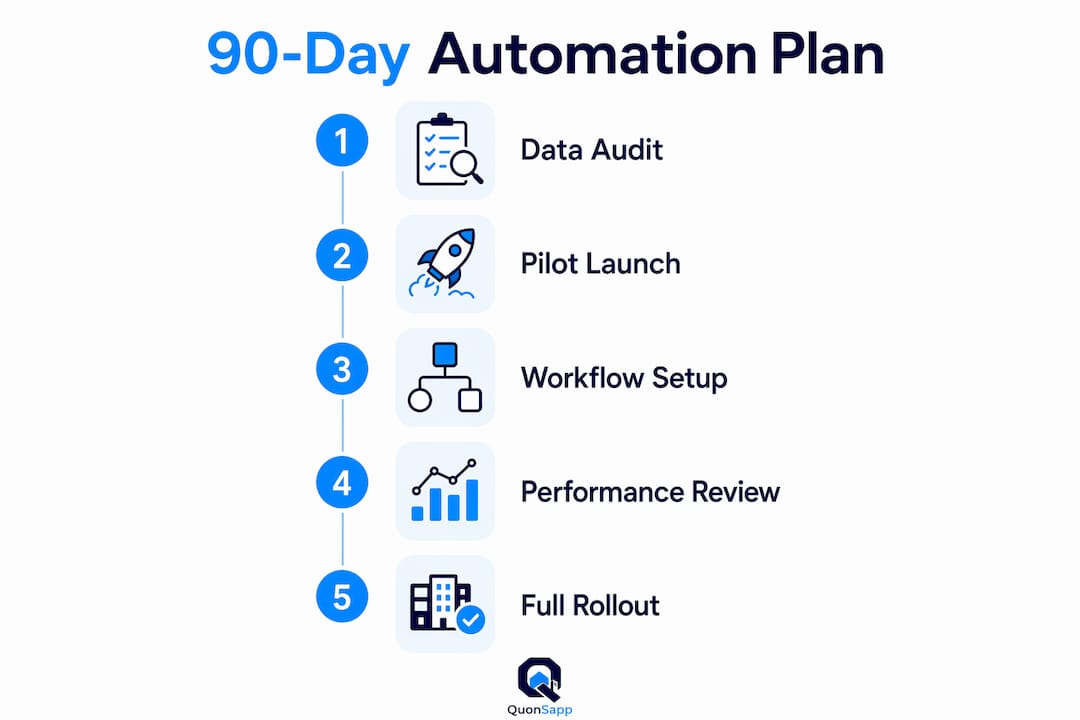
- What does a realistic implementation plan look like?
- What security and compliance requirements should you cover?
- How do you measure whether automation is actually working?
- What pitfalls should you avoid when automating?
- Why QuonSapp works well for US property managers
- Key Takeaways
- The automation gap most managers miss
- See QuonSapp in action before you commit
- Useful sources
Which property management tasks can you automate right now?
Automated property management covers more ground than most managers realize. The tasks below represent the full checklist of what's configurable today, without custom engineering.
Rent collection and payment processing
Set up recurring invoices per unit, enable online card payments, and configure overdue alerts that residents see directly in their portal. Partial payment tracking with a running balance removes the manual ledger update entirely. The goal is zero phone calls about payment status.

Maintenance intake and work-order lifecycle
This is where most automation efforts fall short. Automating the intake form is only step one. The full maintenance lifecycle must carry unit history, prior vendor notes, current photos, access windows, and owner approval thresholds through to vendor assignment and closeout. Without that complete job packet, vendors still reconstruct jobs from incomplete messages, which drives reroutes and reopened work orders.
Resident communication
Pre-approved message templates for move-in, move-out, overdue notices, and package arrivals eliminate the blank-page problem for staff. Push notifications handle routine updates. Reserve human-written messages for disputes and sensitive situations.
Lease and renewal workflows
Auto-generate renewal packets 60–90 days before expiration. Trigger move-out checklists when a non-renewal is confirmed. Track lease start and end dates centrally so nothing slips through.
Inspections and make-ready sequencing
Schedule inspections from templates, attach photo evidence, and auto-generate punch-list tasks from findings. Hold owner approvals in the system rather than via email chains.

Accounting and AP automation
Capture invoices, code bills by category, and export to QuickBooks-compatible formats. Automated reconciliation aids reduce the month-end crunch. For managers who want to outsource the bookkeeping layer entirely, small business accounting support can complement your platform's export capabilities.
Background checks and application workflows
Online application intake triggers credit and background check requests automatically. Staff review results rather than chasing applicants for documents.
Access and amenity booking
Residents request time slots through the portal. Managers approve or deny with notes. Booking rules enforce capacity limits and session durations without manual oversight.
Document automation
Generate notices, letters, and lease addenda from templates. Log every action with a timestamp and user ID in an audit trail.
Pro Tip: Before automating any workflow, confirm that the identifier used to link records (unit number, resident ID, email) is consistent across every system you plan to connect. One mismatch cascades into duplicate records and broken automations.
How do you prioritize which automations to tackle first?
Use a simple scoring framework: frequency × pain/cost × compliance risk × automation feasibility. A task that happens daily, costs significant staff time, carries legal exposure if missed, and is straightforward to configure scores highest. That's rent collection. Maintenance intake scores next. Lease renewals follow.
Consolidating fragmented property data into unified automated workflows lets teams manage larger portfolios without adding headcount. That's the scaling argument for prioritizing high-frequency tasks first.
| Task | Frequency | Pain/Cost | Compliance Risk | Feasibility | Priority |
|---|---|---|---|---|---|
| Rent collection | Daily | High | Medium | High | Quick Win |
| Maintenance intake | Daily | High | Low | High | Quick Win |
| Lease renewals | Monthly | High | High | High | Quick Win |
| Resident messaging | Daily | Medium | Low | High | Quick Win |
| Inspections | Quarterly | Medium | High | Medium | Major Project |
| AP/invoice coding | Monthly | Medium | Medium | Medium | Major Project |
| Background checks | Per applicant | Medium | High | High | Major Project |
| Smart-lock/IoT | Ongoing | Low | Low | Low | Long-term |
| BI/reporting dashboards | Monthly | Low | Low | Medium | Long-term |
Actionable rule: Pilot your Quick Wins on one property for 30–60 days. Measure on-time rent rate and work-order assignment time before expanding. If those two numbers improve, your data is clean enough to scale.
Pro Tip: Use your delinquency rate and service request volume as baseline signals. If a significant share of units are late on rent in a given month, payment automation is your highest-ROI first move.
What tools and integrations does a complete automation stack need?
No single tool does everything well. A practical property management technology stack typically combines several categories:
- Property management platform (PMS): The system of record for residents, leases, units, and financials. Everything else integrates into it.
- Payments processor: Stripe is the standard for direct-to-manager fund flow with PCI compliance built in.
- Accounting connector: QuickBooks export or direct API sync eliminates manual journal entries.
- Maintenance/work-order system: Either built into the PMS or a dedicated tool with two-way sync.
- Background-check provider: API-triggered from the application workflow; results return to the resident profile.
- Smart-lock/IoT layer: Coordinates access windows with work orders and move-in/out events.
- Document automation and e-sign: Template-based generation with audit-logged signatures.
- Reporting/BI: Portfolio-level dashboards that pull from the PMS and accounting connector.
Your integration checklist should confirm:
- Two-way payment webhooks with Stripe (prevents manual reconciliation)
- QuickBooks or accounting export with category mapping
- Background-check API that writes results back to the resident record
- Single sign-on or consistent identity mapping across systems
- Exportable audit logs for every financial and lease change
AI-powered agents can prepare job packets, draft messages, and surface data, but staff still make vendor and financial decisions. Set expectations accordingly when evaluating AI-marketed tools.
Pro Tip: Ask every vendor for a sample audit log and a list of active integrations before signing. Request sandbox access to test the API connection with your accounting system. Vendors who can't produce these in a demo call are telling you something important.
What does a realistic implementation plan look like?
Implementation fails most often when teams try to automate everything at once. A phased approach protects your data, your staff, and your residents.
- Discovery (Week 1–2). Map every manual task. Identify data owners. Flag identifier mismatches between systems.
- Data cleaning (Week 2–3). Standardize unit numbers, resident emails, and vendor contacts. This step is not optional.
- Integration mapping (Week 3–4). Confirm which systems connect, how data flows, and who owns each connection.
- Pilot selection (Week 4). Choose one property or building. Prioritize a site with clean data and a cooperative on-site contact.
- Staff training (Week 4–5). Walk through each automated workflow. Assign ownership. Define escalation paths for edge cases.
- Go-live (Week 5–6). Launch payments and maintenance intake on the pilot property. Monitor daily for the first two weeks.
- Measurement (Day 30–60). Pull on-time rent rate and work-order assignment time. Compare to pre-automation baseline.
- Expand (Day 60–180). Roll out to additional properties. Add lease renewals, inspections, and accounting exports.
Prebuilt workflow templates shorten time-to-value significantly for teams without dedicated engineering resources. Map tasks to roles before customizing any template.
| Milestone | Timeline | Owner |
|---|---|---|
| Data audit complete | Day 30 | Central ops |
| Pilot property live (payments + maintenance) | Day 30 | Site manager + ops |
| First measurement report | Day 60 | Finance + ops |
| Lease renewal automation active | Day 60 | Central ops |
| Accounting export configured | Day 60 | Finance |
| Full portfolio rollout | Day 90–180 | All teams |
Pricing models vary by platform. Most charge a monthly subscription tiered by unit count or portfolio size, with additional fees for property or unit overages. Payment processor fees (typically a percentage per transaction plus a flat fee) are separate. Onboarding and migration costs are often one-time charges. Budget for both the recurring subscription and a one-time setup investment. A useful ROI frame: if automation saves your team 10 hours per week at a fully loaded labor cost of $25 per hour, that's $1,000 per month in recovered capacity. Most platform subscriptions cost a fraction of that.
What security and compliance requirements should you cover?
Payment automation and tenant data handling carry real legal and financial exposure in the US. Here's the minimum control set to demand from any vendor.
- PCI-compliant payment processing. Card data must never touch your servers. Stripe handles PCI scope when configured correctly; confirm your vendor uses a compliant processor and can show you the configuration.
- HTTPS and encryption. Data in transit and at rest must be encrypted. Ask for the vendor's encryption standard.
- Role-based access controls. Staff should see only what their role requires. The NIST definition of access control is a useful baseline when evaluating vendor claims.
- Audit logs. Every financial record change, lease modification, and resident data update should be logged with a timestamp and user ID. These logs are your defense in a dispute or audit.
- Tenant data privacy. Collect only what you need. Define a retention policy. Know how to export and delete resident records when required. Review staff access quarterly.
- Fair Housing compliance. Automated screening and communication workflows must be configured to avoid disparate impact. The Fair Housing Act applies to automated decisions just as it does to manual ones.
- Inspection documentation standards. The National Standards for the Physical Inspection of Real Estate provide a federal reference point for what inspection records should capture.
Ask every vendor: "Can you show me a sample audit log? How do we export all resident data if we leave? Who can access financial records and how is that access logged?"
This guide is general information, not legal or compliance advice. Confirm your specific obligations with a qualified attorney or compliance professional.
How do you measure whether automation is actually working?
Surface-level speed gains are easy to claim. The metrics that actually tell you whether automation is working are handoff-based: measure the time from intake to qualified assignment, not just whether a form was submitted.
Operational KPIs:
- On-time rent rate (percentage of units paying by the due date)
- Days to qualified vendor assignment for work orders
- Percentage of work orders completed without a follow-up call to the vendor
- Average renewal processing time (days from notice to signed renewal)
- Staff hours per unit per month
Financial KPIs:
- Days sales outstanding on rent receivables
- Reduction in late fees that were waived due to process failures
- AP processing time and cost per invoice
| Metric | Measurement Cadence | Target Direction |
|---|---|---|
| On-time rent rate | Daily/weekly | Increase |
| Days to qualified assignment | Weekly | Decrease |
| Work orders closed without follow-up | Weekly | Increase |
| Renewal processing time | Monthly | Decrease |
| Staff hours per unit | Monthly | Decrease |
| Days sales outstanding | Monthly | Decrease |
| AP cost per invoice | Monthly | Decrease |
Set your baseline before go-live. Pull the same numbers at day 30 and day 90. If on-time rent rate and days-to-assignment both improve, your automation is working. If only one improves, investigate the other workflow specifically.
What pitfalls should you avoid when automating?
Most automation projects that stall do so for the same handful of reasons. Here's what to watch for.
Common mistakes:
- Over-automating edge cases. Build your automation around the 80% of transactions that follow a standard pattern. Keep humans in the loop for exceptions, disputes, and anything with legal or financial consequences.
- Skipping data cleaning. Identifier mismatches between your PMS and accounting system will break automations silently. You won't know until a payment doesn't reconcile or a work order goes to the wrong vendor.
- No ownership rules. Every automated workflow needs a named human owner who reviews exceptions and updates the rules when processes change.
- Automating without training. Staff who don't understand what the system is doing will route around it. That creates parallel manual processes and defeats the purpose.
Staff onboarding checklist:
- Walk through each automated workflow in a live demo before go-live.
- Define the escalation path for every exception the automation can't handle.
- Assign one team member as the automation owner per workflow.
- Schedule a 30-day review meeting to surface friction points.
Best practices for durable automation:
- Preserve human review on any rule that changes a financial record or triggers a legal notice.
- Track reroutes and reopened work orders. A rising reroute rate signals a broken job packet, not a vendor problem.
- Version-control your templates and automation rules. When a lease term changes, update the template and log the change.
- Fix operational issues before automating them. If your vendor directory has outdated contacts, automation will dispatch jobs to the wrong people faster than you did manually.
Why QuonSapp works well for US property managers
QuonSapp is built to cover the full automation stack described in this guide, without requiring you to stitch together separate tools for payments, maintenance, leasing, and reporting.
| Capability | QuonSapp |
|---|---|
| Online rent and HOA dues collection | Stripe-powered card payments, direct-to-manager fund flow, partial payments, overdue alerts |
| Maintenance and work orders | Intake with photos, staff/vendor assignment, status pipeline, before/after photo documentation |
| Lease management | Lease tracking, renewal alerts, move-out tracking, online applications with background check workflow |
| Inspections | Scheduled inspections with notes and photo evidence |
| Reporting and analytics | Portfolio dashboard: occupancy, labor costs, maintenance metrics, payment analytics |
| Accounting | Revenue/expense tracking, QuickBooks-compatible payroll export, full invoicing system |
| Integrations | Stripe (payments), ADP/Paychex/QuickBooks (payroll export), CSV import/export, audit log |
| Mobile and field | Native iOS and Android apps, offline-friendly, GPS clock-in/out, real-time sync |
| Security and compliance | PCI-compliant via Stripe, role-based access, full audit log with timestamps and user IDs |
| Multi-property and multi-company | Single dashboard for all properties; parent/sub-org linking for management companies |
Recommended QuonSapp rollout:
- Configure payments first. Set up Stripe, create resident invoices, and enable the resident portal. This is the fastest win and the clearest ROI signal.
- Activate lease tracking. Enter lease dates, set renewal alerts, and upload existing leases to the document library.
- Pilot maintenance intake. Enable work order creation on one property. Assign staff and vendors. Attach photos to every job.
- Expand resident self-service. Turn on amenity booking, package tracking, and announcements for the pilot property.
- Connect accounting exports. Configure QuickBooks-compatible payroll exports and run your first month-end reconciliation through the platform.
- Roll out to additional properties. Use the multi-property dashboard to monitor all sites from one view.
QuonSapp's audit log captures every action with a timestamp and user ID, which satisfies the documentation requirements discussed in the security section. The flat platform fee per payment transaction is configurable: pass it to residents at checkout or absorb it from your payout. For management companies operating multiple portfolios, the parent/sub-org linking consolidates billing and gives the parent organization a network-wide view without exposing sub-org data unless explicitly shared.
Portfolio managers who want to pair QuonSapp's operational data with outsourced bookkeeping can connect operational support workflows to complement the platform's accounting exports.
Key Takeaways
Automation in property management pays off fastest when you start with high-frequency, high-cost tasks and expand only after measuring a clean pilot.
| Point | Details |
|---|---|
| Start with four workflows | Rent collection, maintenance intake, resident messaging, and lease renewals deliver the fastest measurable wins. |
| Clean data before automating | Identifier mismatches between systems break automations silently; audit unit numbers and contacts first. |
| Use handoff metrics | Measure time from intake to qualified assignment, not just submission volume, to confirm automation is working. |
| Phase the rollout | Pilot on one property for 30–60 days, measure two core KPIs, then expand to the full portfolio. |
| QuonSapp covers the full stack | Payments via Stripe, maintenance lifecycle, lease tracking, inspections, and accounting exports in one platform. |
The automation gap most managers miss
There's a version of property management automation that looks good in a demo and falls apart in month two. It's the version where intake is automated but the job packet is incomplete. Vendors get a work order number and a unit, but no access notes, no prior vendor history, no photo of the issue. They call the office. The office calls the resident. The resident calls back two days later. The work order gets reopened.
The real measure of automation success isn't how many forms were submitted digitally. It's whether the person receiving the handoff has everything they need to act without making a single phone call. That's the standard worth holding your platform to.
What we've seen work consistently: automate the packet, not just the trigger. Every maintenance request should carry unit history, contact details, access windows, and photo evidence before it reaches a vendor. Every renewal notice should carry the current lease terms, the proposed new terms, and a direct link for the resident to respond. Every overdue alert should carry the balance, the payment link, and the escalation path if the resident doesn't respond.
The teams that get the most out of automation are the ones who treat it as a documentation discipline first and a speed tool second. Speed follows naturally when the records are complete.
See QuonSapp in action before you commit
If you're ready to move from planning to pilot, a QuonSapp demo gives you a live walkthrough of payments, maintenance, and the resident portal configured for your portfolio type.

Before your demo, have these ready: your unit list and property addresses, your common lease terms and renewal timeline, two or three sample work orders from the past 90 days, and your Stripe account details (or a note that you need to set one up). That's enough to configure a working pilot environment during the call.
The path from demo to pilot typically takes one to two weeks for a single property. From pilot to full rollout, most teams complete the transition within 90 days. Start your QuonSapp trial and see what your portfolio looks like when the manual work is handled by the platform.
Useful sources
The following sources informed this guide and are worth bookmarking for deeper reading on specific topics.
- MIT Real Estate Innovation Lab: Automation in Real Estate — Research-backed analysis of where automation adds real value vs. where it's overhyped; useful for setting realistic expectations with stakeholders.
- HUD: Fair Housing Act Overview — Primary federal guidance on Fair Housing obligations; essential reading before configuring automated screening or communication workflows.
- Federal Register: National Standards for the Physical Inspection of Real Estate — Federal inspection documentation standards; use as a reference when building inspection templates and photo evidence requirements.
- NIST: Access Control Glossary — Technical baseline for role-based access control; useful when evaluating vendor security claims.
- Surface AI: Property Management Workflow Automation — Practical workflow examples covering lease audits, delinquency monitoring, and resident-facing automation; good for building your task checklist.
- Metacto: Property Management Workflow Automation — Practitioner-level detail on maintenance job packet requirements and the human decision points that automation should preserve.
- Beam AI: Property Manager Agent — Overview of AI agent capabilities for maintenance scheduling, tenant communication, and financial tracking; useful for setting realistic AI expectations during vendor evaluation.
- BOMA International — Industry association for commercial real estate operations; publishes standards and benchmarks relevant to building management automation.
When evaluating any vendor, request their integration documentation and ask for sandbox API access before signing. Vendors with mature integrations can provision a test environment within a business day. Those who can't are telling you the integration isn't as production-ready as the sales deck suggests.