
For multi-property managers, landlords, and HOA staff, the right move is an all-in-one, field-to-office inspection platform with offline-first mobile apps, direct integration with your maintenance and work-order system, and audit-ready, time-stamped and geotagged photo evidence. Standalone inspection apps that don't connect to your broader management ecosystem create data silos and force manual re-entry. The platforms worth your time close the loop automatically: field finding → tracked work order → resident notification → invoice.
When evaluating your options, prioritize these four criteria:
- Integration capability with maintenance, accounting, and resident communications
- Offline-first mobile UX that captures photos, checklists, and notes without a signal
- Flat-fee pricing that doesn't penalize you for growing your portfolio
- On-site report completion so inspectors leave the property with a finished, shareable document
Pro Tip: Before demoing any platform, map your current inspection-to-work-order handoff. If it involves email, spreadsheets, or a phone call, that gap is exactly what your new software must close.
Table of Contents
- What does property inspections software actually do?
- Core features every property manager should require
- How inspections connect to your field-to-office workflow
- How to roll out inspection software across multiple properties
- How QuonSapp handles inspections end-to-end
- Vendor evaluation scorecard for your procurement team
- What drives the total cost of inspection software?
- Data security and privacy in property inspection software
- Does inspection software scale with your portfolio?
- What training and support should you expect from providers?
- How to get your team to actually use the new software
- Key Takeaways
- The case for switching from manual inspections
- QuonSapp brings inspection tracking into your full portfolio workflow
- Useful sources and further reading
What does property inspections software actually do?
Property inspection software combines a mobile app with a web back office to handle scheduling, custom checklists, photo and video capture, time-stamps, geotags, and automated branded reports. The field app is where the work happens; the back office is where managers review findings, assign work orders, and store audit-ready records.
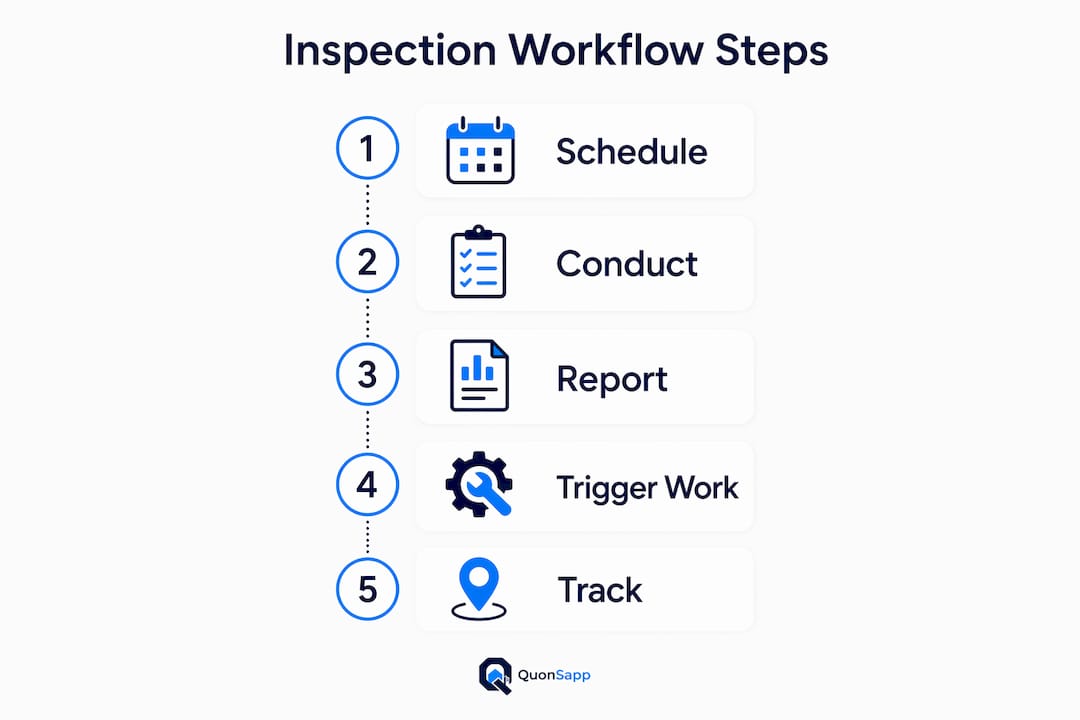
A typical workflow looks like this:
- Schedule the inspection and assign it to an inspector via the web dashboard.
- Inspector opens the mobile app on-site, selects the property template, and walks through each room or area.
- Photos, voice notes, and checklist items are captured with automatic time-stamps and GPS coordinates.
- The platform assembles a branded report automatically, often within seconds of the final submission.
- Flagged items trigger maintenance work orders, and the resident or owner receives a notification with the report.
The move-in/move-out comparison is where this workflow pays off most visibly. Side-by-side comparison reports with highlighted differences give both managers and residents a clear, documented record of property condition at each lease event, which materially reduces security-deposit disputes.
Pro Tip: Use move-in and move-out inspections as your primary dispute-prevention tool. A geotagged photo from Day 1 is worth more in a mediation than any written description.
Core features every property manager should require
Not all real estate inspection tools are built for portfolio-scale operations. Here's what separates a capable platform from a basic checklist app:
- Offline-first mobile operation. True offline support means full data entry, photo capture, and markups work without a signal, then sync automatically when connectivity returns. Partial "save" modes that only cache text fail in basements and new construction. Offline-first capability is non-optional for multi-property teams.
- Custom templates and checklists. ASHI and InterNACHI templates cover home inspection standards; portfolio managers also need HOA common-area, turnover, and compliance-specific templates they can build and reuse.
- Time-stamped and geotagged photo/video. Geotags prevent disputes about which unit or property was inspected. Timestamps establish the exact date and time of documented conditions.
- AI-assisted comment generation and voice-to-text. AI-powered features like voice-to-text and automatic photo defect detection enable on-site report completion, cutting post-inspection desk work significantly.
- Move-in/move-out comparison view. Side-by-side evidence display is the clearest way to document condition changes between tenancies.
- E-signatures. Resident sign-off on inspection reports closes the documentation loop and strengthens legal defensibility.
- Integration with maintenance, work orders, and accounting. A finding that doesn't automatically create a tracked work order is a finding that may get lost.
- Role-based permissions and audit log. Managers, inspectors, and residents should each see only what they need. Every action should be logged with a timestamp and user ID.
For a solo inspector or small landlord, offline-first mobile and custom templates are the minimum viable feature set. For a centralized team managing 50+ units, add role-based permissions, API integrations, and consolidated reporting across properties.
Pro Tip: During any pilot, test offline mode in an actual basement or parking garage. If the app stalls or loses data, it will fail you in the field.

How inspections connect to your field-to-office workflow
The operational case for inspection software isn't just faster reports. It's the entire chain from field observation to resolved maintenance ticket to closed invoice.
Primary benefits for portfolio managers:
- Faster report delivery to owners and residents, often within minutes of completing the walkthrough
- Fewer deposit disputes through audit-ready, timestamped documentation
- Quicker maintenance turnaround when flagged items auto-generate assigned work orders
- Cleaner resident communications with automatic notifications tied to inspection outcomes
Practical use cases that illustrate the value:
- Move-in/move-out audits. Capture condition at both lease events; compare side-by-side at move-out to support or refute deposit deductions.
- Routine safety and compliance checks. Schedule recurring fire safety, HVAC, or HOA common-area inspections with automatic reminders.
- Pre-lease turnover inspections. Document punch-list items, assign them to vendors, and track completion before the next resident moves in.
- Vendor acceptance checks. Confirm completed work with before/after photos attached directly to the work order.
- HOA common-area audits. Log HOA violations with photo evidence, assign fines, and track resolution from open to closed.
When a flagged item triggers a work order automatically, the inspector's photo becomes the work order's before-photo. When the vendor marks the job complete, their after-photo closes the evidence chain. That's the field-to-office loop working as it should.
Pro Tip: Attach inspection findings directly to resident profiles so your team has a full condition history at every lease renewal or move-out conversation.
How to roll out inspection software across multiple properties
A structured rollout prevents the two most common failure modes: under-trained inspectors and disconnected integrations.
- Audit current templates (Week 1–2). Document every checklist your team uses today. Identify gaps, redundancies, and compliance requirements by property type.
- Map integrations (Week 2–3). Confirm how inspection findings will flow into your maintenance system and property accounting software. Resolve any API or data-format issues before the pilot.
- Pilot with 1–2 properties (Weeks 3–6). Run real inspections, measure report completion time, and verify that work orders are created and assigned correctly.
- Train inspectors and staff (Weeks 5–7). Role-based, mobile-first training sessions of 60–90 minutes each. Focus on the field app first; the web dashboard comes second.
- Full rollout (Weeks 7–18 for enterprise portfolios). Migrate remaining properties, activate integrations, and establish QA checkpoints.
Key dependencies to resolve before you start: device provisioning for field staff, template finalization, and integration credentials for your maintenance and accounting systems.
- Keep training sessions short and role-specific. Inspectors need the mobile app; managers need the dashboard.
- Incentivize on-site report completion from day one. Reports finished in the field are more accurate and reduce back-office correction cycles.
- Set measurable KPIs for the pilot: report completion rate, time from inspection to work-order creation, and dispute rate at move-out.
Pro Tip: Flat-fee subscription pricing, rather than per-inspection billing, removes the cost anxiety that slows adoption. Inspectors who know there's no per-report charge are more likely to run thorough, complete walkthroughs.
How QuonSapp handles inspections end-to-end
QuonSapp is built as a property portfolio management platform where inspection tracking is woven into the same system as resident management, maintenance, and accounting. That integration is the core differentiator.
Key inspection capabilities in QuonSapp:
- Schedule and document inspections with notes and photo evidence, tied directly to specific units and residents
- Native iOS and Android app with offline-friendly operation for field use
- Before/after photo documentation attached to every work order for a complete evidence chain
- Automatic work-order creation from flagged inspection items, with staff or vendor assignment and a status pipeline (submitted → assigned → in progress → completed)
- Resident notifications and messaging tied to inspection outcomes
- Full audit log with timestamps and user records for every action
- Stripe direct-to-manager payments so inspection-triggered invoices (repairs, fees) are collected without an intermediary
Implementation with QuonSapp means your inspection findings, work orders, resident communications, and payment records all live in one account. There's no export-and-import step between your inspection app and your property management system.
- Set up your property and unit structure in QuonSapp.
- Schedule inspections and assign them to staff.
- Complete the walkthrough on the mobile app, capturing photos and notes.
- Flagged items become work orders; residents receive notifications automatically.
- Completed work orders close the evidence chain with after-photos and timestamps.
Pro Tip: Use QuonSapp's audit log during any deposit dispute. Every photo, note, and status change carries a timestamp and the name of the staff member who made it.
Vendor evaluation scorecard for your procurement team
Use this scoring table to evaluate any platform consistently. Score each dimension 1–5, then total the rows.
| Evaluation Dimension | What to Assess | Score (1–5) |
|---|---|---|
| Integration breadth | Connects to maintenance, accounting, and resident comms | |
| Offline capability | Full data entry, photos, and markups work without signal | |
| On-site report completion | Report finishes before inspector leaves the property | |
| Pricing model | Flat subscription vs. per-inspection or per-unit fees | |
| Security and data ownership | Audit log, role-based access, data export controls | |
| Training and support | Onboarding resources, live support, documentation quality | |
| AI and automation features | Voice-to-text, defect detection, auto work-order creation |
Top questions to ask vendors during demos:
- Does offline mode support full photo capture and markup, or only text entry?
- How does a flagged inspection item become a tracked work order?
- Can we customize templates by property type and compliance requirement?
- What happens to our data if we cancel?
Questions to ask your own team before signing:
- Which integrations are non-negotiable on day one?
- Who owns template creation and ongoing QA?
- How will we measure success in the first 90 days?
For checklist customization guidance and pilot budgeting support, a structured planning resource can help teams scope the implementation before committing to a platform.
What drives the total cost of inspection software?
Pricing models vary significantly, and the model matters as much as the monthly rate. Per-inspection pricing creates a direct cost for every walkthrough your team runs, which discourages thorough documentation as portfolios grow. Flat monthly subscriptions that allow unlimited inspections remove that friction entirely.
The main cost drivers to evaluate:
- Base subscription tier based on portfolio size (number of properties or units)
- Per-inspection or per-report fees that add up quickly on active portfolios
- User seat fees for additional inspectors or staff
- Integration and API access sometimes gated behind higher tiers
- Onboarding and training costs that may be charged separately
For growing portfolios, flat-fee subscriptions yield predictable costs. A platform that charges per inspection will cost more as you scale, precisely when you want to inspect more frequently.
Data security and privacy in property inspection software
Inspection records contain sensitive information: resident names, unit addresses, photos of personal property, and financial details tied to damage claims. The platform you choose must treat that data with care.
Key security requirements:
- Role-based access controls so inspectors see only their assigned properties and residents see only their own records
- Audit log capturing every action with a timestamp and user ID, which is critical for legal defensibility
- Data ownership and export rights so you can retrieve your records if you switch platforms
- Encrypted data transmission and storage as a baseline expectation
- Sub-organization data controls for management companies overseeing multiple client portfolios
QuonSapp's data ownership controls let sub-organizations choose whether to share data with a parent organization or keep it fully private, which is particularly relevant for third-party management companies handling multiple HOA clients.
Does inspection software scale with your portfolio?
The short answer: it depends on the pricing model and the platform's architecture. A platform built for single-property home inspectors will show cracks at 50+ units. A cloud-based property management platform designed for portfolios handles multi-property scheduling, consolidated reporting, and multi-company management from the start.
Scalability signals to look for:
- Multi-property dashboard with portfolio-level inspection status
- Bulk scheduling and recurring inspection automation
- Consolidated reporting across all properties in one view
- Multi-company or parent/sub-org structure for management companies
- Per-seat-free pricing for staff accounts so adding inspectors doesn't add cost
QuonSapp's Organization and Enterprise plans include multi-company linking with consolidated billing, letting parent organizations see total properties, units, residents, and staff across all linked sub-organizations at a glance.
What training and support should you expect from providers?
The best platforms offer layered support: self-serve documentation for day-to-day questions, role-specific onboarding for new staff, and live support for integration issues. What to look for:
- Video walkthroughs for the mobile app, broken down by role (inspector, manager, admin)
- Template libraries with pre-built ASHI, InterNACHI, and property-type-specific checklists
- Live chat or email support with a reasonable response SLA
- In-app guidance that surfaces contextually during the first few inspections
- Migration support if you're moving data from a legacy system or spreadsheets
Platforms that charge for onboarding separately from the subscription often signal that the product isn't intuitive enough to self-serve. Prioritize platforms where onboarding is included.
How to get your team to actually use the new software
Adoption is where most rollouts stall. The technology is rarely the problem; the workflow change is.
- Start with the pain. Show inspectors the specific moment where the old process breaks down (lost photos, re-typed notes, disputed deposits) and connect the new tool directly to that fix.
- Make the mobile app the first training focus. Inspectors who feel confident on the app in the field will use it. Managers who only train on the web dashboard miss the adoption bottleneck.
- Set a 30-day completion rate target. Track what percentage of scheduled inspections result in a completed, submitted report. That number tells you more about adoption than any survey.
- Celebrate early wins. A move-out inspection that resolved a deposit dispute cleanly, or a work order that closed in 48 hours because the photo evidence was already attached, is worth sharing with the whole team.
- Reduce friction at every step. If logging in takes more than two taps, inspectors will revert to paper. Choose a platform with a simple, fast mobile interface.
Resistance from experienced staff usually comes from unfamiliarity, not opposition. Short, role-specific training sessions of 60–90 minutes, paired with a quick-start card for the field app, address most of it.
Key Takeaways
All-in-one, field-to-office inspection platforms with offline-first mobile apps, flat-fee pricing, and direct maintenance integration deliver the best operational outcomes for multi-property portfolios.
| Point | Details |
|---|---|
| Choose field-to-office platforms | Standalone inspection apps that don't connect to maintenance and accounting create costly data silos. |
| Require true offline-first mobile | Full photo capture, checklists, and markups must work without a signal and sync automatically on reconnect. |
| Demand maintenance integration | Flagged inspection items should auto-generate tracked work orders without manual re-entry. |
| Prefer flat-fee subscription pricing | Per-inspection billing penalizes portfolio growth; flat subscriptions keep costs predictable at scale. |
| QuonSapp closes the full loop | Inspection tracking, work orders, resident notifications, and Stripe payments all live in one platform. |
The case for switching from manual inspections
Manual inspection workflows have a hidden cost that doesn't show up on any spreadsheet: the time spent reconstructing what happened after a dispute. When a resident challenges a deposit deduction and your evidence is a handwritten note and a blurry phone photo with no timestamp, you're negotiating from a weak position. Every time.
Switching to an integrated inspection workflow changes that dynamic. Time-stamped, geotagged photos tied to a specific unit and lease event are hard to dispute. Work orders that trace back to an inspection finding show residents and vendors that your process is documented and consistent. Faster turnovers, fewer back-and-forth emails, and cleaner move-out settlements are the practical outcomes. The technology isn't the point. The documented, defensible process it creates is.
QuonSapp brings inspection tracking into your full portfolio workflow
If you're managing multiple properties and still running inspections on paper or a disconnected app, QuonSapp gives you a faster path to a documented, defensible process. Inspection tracking, work orders, resident communications, and direct Stripe payments all operate from a single account dashboard, with no middleware and no re-entry.

What you get in a QuonSapp demo: a walkthrough of the inspection-to-work-order workflow, a review of how your current templates map to the platform, and a realistic timeline for your portfolio size. The mobile app runs on iOS and Android with offline-friendly operation, so your inspectors can capture everything in the field and sync when they're back in range.
Start your QuonSapp trial and see how the full field-to-office workflow runs in a single platform built for property managers, HOA boards, and maintenance teams.
Useful sources and further reading
The sources below back claims made in this guide and provide templates, product pages, and deeper technical detail for specific features.
- GoAudits Property Inspection App — Product page covering digital checklists, offline operation, instant report generation, and task assignment for property managers. Useful for understanding inspection reporting software benchmarks.
- Property Inspect Platform — Inspection, reporting, and compliance software covering move-in/move-out, defect tracking, and audit-ready workflows. Strong reference for compliance inspection templates.
- Property Inspect US — US-specific product page for portfolio inspection management, offline capture, and API integrations.
- InspectAI — AI-powered home inspection software using voice-first documentation, LiDAR scanning, and ASHI/InterNACHI templates. Reference for AI-assisted on-site report completion.
- Palmtech 11 — Home inspection software with AI image defect detection, comment library, and cross-device operation. Useful for understanding AI feature benchmarks in inspection reporting software.
- Navilot — How It Works — Partner resource on checklist customization and inspection planning processes, useful for teams building custom templates before a platform rollout.