
For HOA managers, multi-property operators, and on-site staffed buildings, QuonSapp is the recommended AppFolio alternative in 2026. It covers the full operational stack — HOA workflows, resident payments via Stripe, maintenance with photo documentation, GPS staff clock-in, and native mobile apps — at a flat subscription price with no per-unit minimums that penalize smaller portfolios.
That said, the right pick depends on where you operate. Here is how the market breaks into four lanes:
- Enterprise accounting platforms (complex mixed portfolios, 500+ units, deep GL needs)
- Mid-market residential platforms (100–500 units, residential-first, strong owner reporting)
- Single-family specialist tools (SFR portfolios, tenant screening, simple accounting)
- Low-cost or free tools (under 50 units, basic rent collection, minimal overhead)
Three quick tiebreakers before you read further:
- Portfolio size and mix — HOA, mixed-use, and multi-company portfolios need features that general residential platforms often skip.
- Pricing shape — AppFolio's Core tier runs $1.40/unit/month, which adds up fast for smaller operators. Flat-tier or low-floor per-unit alternatives can cut that cost significantly.
- Migration difficulty — switching platforms mid-cycle costs real time and money; budget a 60–90 day buffer and factor in data-mapping and retraining costs before you commit.
Table of Contents
- Which AppFolio alternatives match your portfolio size and budget?
- Detailed profiles of the top AppFolio competitors
- How do you pick the right property management software?
- What does switching from AppFolio actually involve?
- Why QuonSapp stands out as an AppFolio alternative
- Key Takeaways
- The market is shifting, and AppFolio's pricing model is part of why
- QuonSapp is built for the managers AppFolio leaves underserved
- Useful sources and further reading
Which AppFolio alternatives match your portfolio size and budget?
The table below maps each lane to the criteria that matter most at the shortlisting stage. Pricing examples use a 200-unit portfolio as the baseline for comparison.
| Lane | Best for | Pricing model | Est. monthly (200 units) | Standout features | Onboarding & support | Integrations / API | Migration difficulty |
|---|---|---|---|---|---|---|---|
| QuonSapp | HOA, multi-property, on-site staffed | Flat subscription tiers | Not publicly listed (contact for quote) | HOA workflows, Stripe payouts, GPS clock-in, maintenance photo docs | Self-setup + guided onboarding | Stripe native; CSV import/export | Low |
| Enterprise platforms (e.g., RealPage, Entrata, Yardi Breeze) | 500+ units, mixed portfolios, complex GL | Per-unit + modules | — | Deep GL, owner statements, enterprise reporting | Paid onboarding + dedicated CSM | Open API, broad integrations | High |
| Mid-market residential (e.g., Buildium, Rent Manager, DoorLoop) | 50–500 units, residential/association | Per-unit or flat tiers | — | Resident portals, owner reporting, maintenance | Self-setup or paid onboarding | Moderate API, QuickBooks sync | Medium |
| SFR specialists (e.g., Propertyware) | Single-family portfolios, 100+ doors | Per-unit, minimums apply | — | SFR-specific workflows, tenant screening | Paid onboarding | API available | Medium |
| Low-cost / free tools (e.g., TenantCloud, RentRedi) | Under 50 units, basic rent collection | Free tier or low flat fee | — | Online rent collection, basic leasing | Self-setup only | Limited | Low |
Buyers commonly evaluate alternatives by capability lane rather than direct vendor head-to-head — matching portfolio complexity to the right lane first saves weeks of wasted demos. BC Solutions' fit-based framework maps this clearly.
For a 200-unit portfolio on AppFolio Core at $1.40/unit/month, you are looking at $280/month before any add-ons. Mid-market flat-tier platforms often land in the same range, but without per-unit minimums that scale costs as you grow. ITQlick's side-by-side cost comparisons show these deltas clearly across several alternatives.
Pro Tip: Before you shortlist vendors, classify your portfolio: residential-only, HOA-only, mixed, or SFR. That single classification eliminates at least two lanes immediately and saves you from demoing the wrong platforms.
Detailed profiles of the top AppFolio competitors
Gartner Peer Insights and G2's alternatives listing both surface the same core set of platforms buyers consider when leaving AppFolio. Here is what each one actually offers.
QuonSapp
What it is: An all-in-one property portfolio manager purpose-built for HOA managers, building supervisors, front desk staff, and maintenance workers. It handles the full operational day, not just accounting.
Best for: HOA communities, multi-property portfolios with on-site staff, managers who need field mobility and resident-facing workflows.
Pricing: Flat subscription tiers; no per-unit minimums publicly listed. Contact for a custom quote based on portfolio size.
Pros:
- Full HOA workflow suite: dues invoicing, violation tracking, fine management, board votes, ARC requests
- Resident payments go directly to your Stripe account with no intermediary hold period
- GPS clock-in/out, shift scheduling, and payroll export (ADP, Paychex, QuickBooks-compatible) built in
Cons:
- Pricing not publicly listed, so you need to request a quote
- Accounting depth is operational-level (revenue, expenses, invoicing) rather than full-GL enterprise accounting
- Newer platform, so the third-party integration ecosystem is still growing
Standout features: Native iOS and Android apps with offline capability; multi-company parent/sub-org linking with consolidated billing; $1.00 flat per-transaction fee with configurable passthrough to residents.
Buildium
What it is: A mid-market residential and association management platform owned by RealPage. Strong owner reporting and resident portal.
Best for: 50–500 unit residential portfolios and community associations. A solid mid-market pick for managers who need owner statements and basic accounting. See a detailed Buildium comparison for a deeper look at how it stacks up.
Pricing: Per-unit pricing with tiered plans; minimums apply on lower tiers.
Pros:
- Strong owner and tenant portals
- Built-in accounting with bank reconciliation
- Association management features included
Cons:
- Per-unit pricing scales costs as portfolio grows
- HOA workflow depth is limited compared to dedicated HOA platforms
- Customer support response times draw mixed reviews on G2
Standout features: Owner statement generation; online lease signing; maintenance request tracking with vendor management.
Yardi Breeze
What it is: The mid-market entry point of the Yardi ecosystem. Designed for residential, commercial, and mixed portfolios that want Yardi's accounting depth without the full Voyager implementation cost.
Best for: 50–500 unit mixed or commercial portfolios that need solid GL accounting and are comfortable with a per-unit model.
Pricing: Per-unit per month; separate tiers for residential and commercial.
Pros:
- True double-entry accounting with full GL
- Handles residential and commercial in one platform
- Backed by Yardi's enterprise-grade infrastructure
Cons:
- Interface is less intuitive than newer platforms; steeper learning curve
- HOA-specific workflows are limited
- Migrating out of Yardi later is notoriously difficult
Standout features: Full chart-of-accounts control; built-in CRM for prospect tracking; online payments with bank reconciliation.
Rent Manager
What it is: A long-standing property management platform with deep accounting and a highly configurable data model. Popular with operators who want to customize workflows.
Best for: Mid-to-large portfolios (100–1,000+ units) with complex accounting needs or non-standard workflows.
Pricing: Per-unit pricing; contact for volume quotes.
Pros:
- Highly configurable — custom fields, custom reports, custom workflows
- Deep accounting with full GL and owner statements
- Strong API with a published developer portal
Cons:
- Steep learning curve; implementation typically requires professional services
- UI feels dated compared to newer platforms
- HOA features exist but are not a primary focus
Standout features: Open API with extensive documentation; robust work order and vendor management; multi-entity accounting.
Entrata
What it is: An enterprise multifamily platform targeting large operators (500+ units) with a full suite covering leasing, accounting, maintenance, and resident services.
Best for: Large multifamily operators and REITs that need enterprise-grade reporting, integrations, and compliance tools.
Pricing: Custom enterprise pricing; not publicly listed.
Pros:
- End-to-end suite from marketing to accounting
- Strong integrations with revenue management tools
- Dedicated customer success management
Cons:
- Priced for enterprise; cost is prohibitive for smaller operators
- Implementation timelines run 3–6 months
- HOA and SFR workflows are not a focus
Standout features: Centralized leasing and marketing hub; enterprise-grade owner reporting; broad third-party integration library.
Propertyware
What it is: A single-family rental specialist platform. Built specifically for SFR portfolios, with tenant screening, maintenance, and owner reporting tuned for scattered-site management.
Best for: SFR portfolios of 100+ doors. BC Solutions' fit mapping consistently places Propertyware in the SFR lane.
Pricing: Per-unit per month with minimum monthly fees.
Pros:
- SFR-specific workflows that multifamily platforms lack
- Strong owner portal and owner statement generation
- Maintenance coordination built for scattered-site operations
Cons:
- Not suited for multifamily, HOA, or commercial
- Per-unit minimums make it expensive for smaller SFR portfolios
- Mobile app quality lags behind newer platforms
Standout features: Tenant screening integration; owner contribution tracking; maintenance request portal for tenants.
DoorLoop
What it is: A newer, design-forward property management platform targeting small-to-mid residential managers who want a clean interface and fast onboarding.
Best for: 1–500 unit residential portfolios where ease of use and quick setup matter more than deep accounting customization.
Pricing: Per-unit pricing with tiered plans; lower minimums than AppFolio.
Pros:
- Clean, modern UI with fast onboarding
- Solid rent collection and tenant communication tools
- QuickBooks integration for accounting handoff
Cons:
- Accounting depth is limited; relies on QuickBooks for serious GL work
- HOA workflows are basic
- API access is limited on lower tiers
Standout features: Automated rent reminders; tenant screening built in; responsive customer support noted frequently on G2.
TenantCloud
What it is: A free-to-low-cost platform for independent landlords and small portfolios. Covers the basics: rent collection, lease storage, and maintenance requests.
Best for: Landlords with under 50 units who want online rent collection without a monthly software bill. Check out affordable property management options for a broader cost comparison.
Pricing: Free tier available; paid plans start low per month.
Pros:
- Free tier covers rent collection and basic leasing
- Simple enough for non-technical landlords
- Tenant screening add-on available
Cons:
- Very limited accounting; no GL or owner statements
- No HOA features
- Support is minimal on the free tier
Standout features: Free online rent collection; lease template library; maintenance request tracking.
RentRedi
What it is: A mobile-first landlord tool built for self-managing landlords. Strong on tenant screening and rent collection; light on accounting.
Best for: Independent landlords with 1–30 units who manage from their phone.
Pricing: Low flat monthly fee; no per-unit charges.
Pros:
- Flat pricing regardless of unit count (within plan limits)
- Strong mobile experience for landlords and tenants
- Tenant screening and e-lease signing included
Cons:
- No meaningful accounting or owner reporting
- No HOA features
- Not suited for portfolios with on-site staff or complex workflows
Standout features: Mobile-first design; prequalification screening; automated rent reminders via SMS.
RealPage
What it is: An enterprise multifamily platform serving large operators, REITs, and institutional owners. Deep revenue management, compliance, and analytics.
Best for: 500+ unit multifamily operators who need revenue management, compliance reporting, and enterprise integrations.
Pricing: Custom enterprise pricing; implementation costs are significant.
Pros:
- Industry-leading revenue management (LRO/AI Pricing)
- Broad integration ecosystem
- Enterprise compliance and audit tools
Cons:
- Not accessible for small or mid-market operators
- Implementation is complex and expensive
- HOA and SFR use cases are outside its core design
Standout features: AI-driven pricing optimization; enterprise-grade analytics; extensive third-party integration library.
Pro Tip: When reviewing user feedback on Capterra and G2 product pages, filter reviews by company size — a 10-unit landlord and a 500-unit operator experience the same platform very differently. Match the reviewer profile to your own portfolio before weighing their verdict.
How do you pick the right property management software?
A structured decision process saves you from choosing a platform that looks good in a demo but fails in daily operations. Work through this checklist before you schedule a single vendor call.
Decision checklist
Map your operating needs to the features that actually matter:
- Portfolio type: residential-only, HOA/community, SFR, mixed, or multi-company
- Unit count: under 50, 50–200, 200–500, or 500+
- Accounting depth needed: basic invoicing, owner statements, or full GL with bank reconciliation
- HOA workflows required: dues invoicing, violation tracking, board votes, ARC requests
- Field staff on-site: GPS clock-in, shift scheduling, work order assignment, offline mobile access
- Owner reporting: frequency, format, and level of detail owners expect
- API/integration needs: QuickBooks, payroll systems, screening providers, revenue management tools
- Migration timeline: can you run a 60–90 day pilot, or do you need a hard cutover date?
Demo questions to bring to every vendor
- How does your chart of accounts map from AppFolio's data model? Can you show a sample import?
- Walk me through owner statement generation for a mixed portfolio — how are management fees calculated?
- How does your payment flow work? Do funds land directly in my account, or does the platform hold them?
- What is your API rate limit, and do you publish a developer portal with documentation?
- Can you show a bulk import of tenant ledgers and lease records from a CSV export?
- What does your migration support include — is it self-service, or do you assign a migration specialist?
- For HOA portfolios: show me the violation-to-fine workflow, board vote creation, and ARC request approval.
- How does role-based access work for multi-company parent/sub-org structures?
Scorecard template
Weight these factors based on your portfolio's priorities. A 1–5 score per vendor gives you a defensible shortlist.
| Factor | Recommended weight | Vendor A score | Vendor B score | QuonSapp score |
|---|---|---|---|---|
| Accounting depth and owner reporting | 15% | — | — | — |
| Integrations and API availability | 10% | — | — | — |
| Mobile and field staff capability | 10% | — | — | — |
What does switching from AppFolio actually involve?
Migration is where most platform switches go wrong. The operational friction is real: CostBench documents that data mapping, staff retraining, and a temporary productivity dip are the most commonly reported migration pain points. Budget for all three.
Migration timeline
| Phase | Duration | Key activities | Owner |
|---|---|---|---|
| Prep and scoping | 2–4 weeks | Audit current data, define chart-of-accounts mapping, assign migration lead | Operations manager |
| Data extract and mapping | 2–4 weeks | Export tenant ledgers, leases, work orders, vendor lists from AppFolio; map fields to new platform | Migration lead + vendor support |
| Pilot (one property or owner) | 4–8 weeks | Import subset, reconcile accounting, test payment flows, generate sample owner statements | Finance + operations |
| Full cutover | 1–2 weeks | Import all data, validate, go live, notify residents and owners | All teams |
| Post-cutover support | 4 weeks | Monitor payment flows, resolve import errors, complete staff retraining | Operations + vendor CSM |
Data export and import checklist
Before you extract anything from AppFolio, confirm you have all of these:
- Chart of accounts (full GL structure, not just categories)
- Owner records with contact details and statement preferences
- Tenant ledgers with full payment history and outstanding balances
- Active and expired leases with all key dates
- Open and closed work orders with vendor assignments
- Vendor directory with contact info and service categories
- Bank account and trust account records
- Document library (leases, CC&Rs, notices)
Common field-mapping pain points: AppFolio's owner contribution fields often don't map cleanly to other platforms' equity structures. Tenant ledger date formats vary. Work order status labels rarely match one-to-one. Plan for manual cleanup on at least 10–15% of records.
Pilot test plan
Run these checks during your 30–60 day pilot before committing to full cutover:
- Accounting reconciliation: does the imported ledger match AppFolio's closing balance to the cent?
- Payment flow test: process one live payment and confirm funds land in the correct account
- Work order workflow: submit, assign, update, and close a test work order end-to-end
- Owner statement sample: generate a statement for one owner and compare it to AppFolio's output
- Resident portal test: have one resident log in, view their balance, and make a partial payment
Why QuonSapp stands out as an AppFolio alternative
QuonSapp is built for the managers AppFolio's pricing model tends to penalize: HOA communities, multi-property operators with on-site staff, and building supervisors who need field tools as much as back-office accounting. Here is how it maps to the selection criteria used throughout this article.
Cost framing
AppFolio Core's pricing model is per unit per month, so the monthly cost scales with portfolio size, which can add up for mid-size portfolios. QuonSapp uses flat subscription tiers with no per-unit minimums, so your cost doesn't scale linearly with every unit you add. For HOA managers who also need staff scheduling, GPS tracking, and violation workflows, those features are included rather than priced as modules.
Objective comparison on key dimensions
| Dimension | QuonSapp | Enterprise platforms | Mid-market residential |
|---|---|---|---|
| HOA workflows | Full suite (dues, violations, fines, votes, ARC) | Limited or add-on | Partial |
| Accounting depth | Operational (invoicing, revenue/expense tracking) | Full GL | Full GL |
| Mobile / offline | Native iOS + Android, offline-capable | Varies | Varies |
| Staff scheduling / GPS | Built in | Rarely included | Rarely included |
| Migration difficulty | Low (CSV import, guided onboarding) | High | Medium |
| Pricing transparency | Contact for quote | Custom / opaque | Per-unit with minimums |
Demo checklist for QuonSapp
When you schedule your QuonSapp demo, ask to see:
- HOA dues bulk send and violation-to-fine workflow end-to-end
- Stripe payout demo: process a test payment and confirm direct-to-account deposit
- Work order creation with photo attachment, staff assignment, and status update
- GPS clock-in on mobile and payroll export preview
- Multi-property dashboard with occupancy and payment analytics
- CSV import of a sample resident list and lease data
- Offline mode: navigate core screens with airplane mode enabled
Request migration references from managers who switched from AppFolio specifically. Ask them how long the data import took and whether accounting reconciliation was clean on the first pass.
For a broader view of property portfolio management software and what the full feature set looks like across platforms, that guide covers the analytics and reporting layer in depth.
Key Takeaways
The right AppFolio alternative depends on portfolio type first, then cost shape, then migration complexity — not the other way around.
| Point | Details |
|---|---|
| Match lane to portfolio type | HOA and multi-property operators need a different platform than SFR or large multifamily operators. |
| AppFolio's per-unit pricing | AppFolio's cost structure is based on a per-unit monthly fee, which may not be cost-effective for smaller or HOA-heavy portfolios. |
| Budget 60–90 days for migration | Data mapping, pilot testing, and staff retraining add real time and cost; plan for temporary dual-licensing. |
| HOA features are often missing | Dues invoicing, violation workflows, board votes, and ARC requests are absent from most general-purpose platforms. |
| QuonSapp for HOA and on-site staffed | QuonSapp covers HOA workflows, Stripe payouts, GPS staff tools, and native mobile apps in one flat-tier subscription. |
The market is shifting, and AppFolio's pricing model is part of why
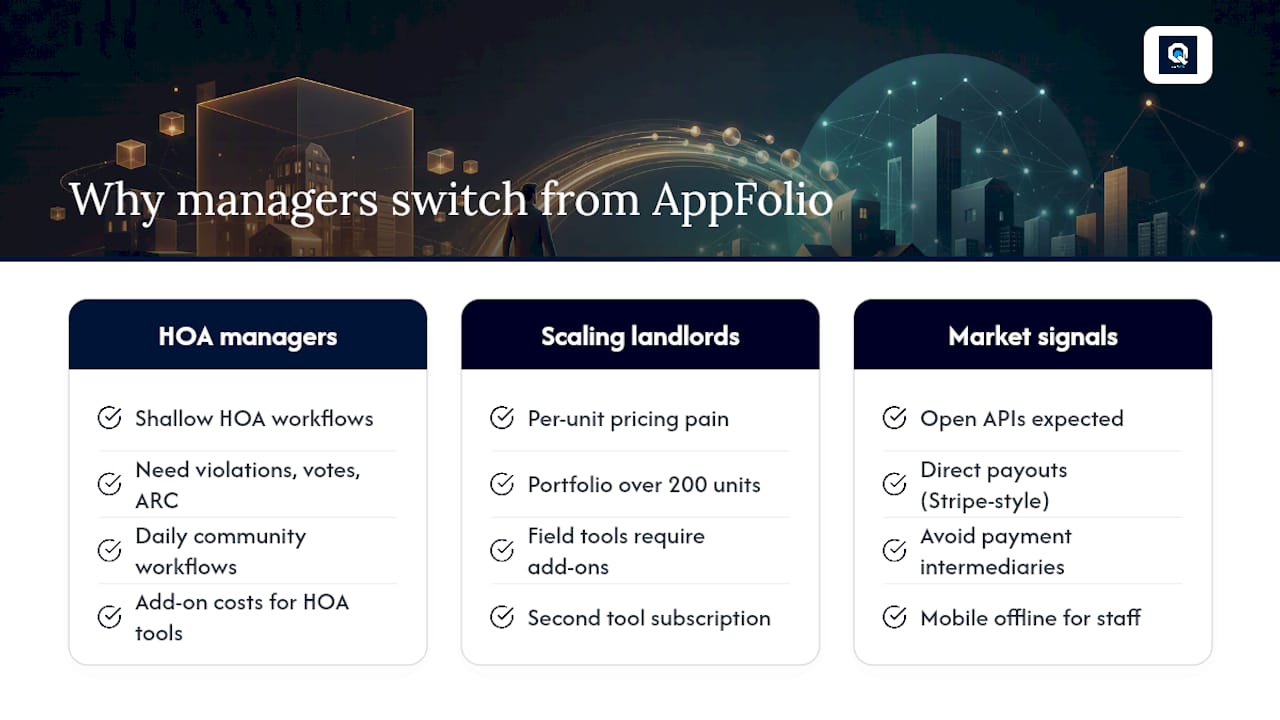
The operators I see switching from AppFolio in 2026 fall into two clear groups. The first group grew into HOA or mixed-use management and found that AppFolio's HOA workflow depth didn't keep pace with their operational needs. Violation tracking, board votes, and ARC requests are not afterthoughts for a community association manager — they are daily workflows. The second group hit a cost inflection point: as their portfolio scaled past 200 units, AppFolio's per-unit model started producing monthly bills that didn't feel proportional to the value delivered, especially when field staff tools and HOA features required add-ons.
Consider a manager who started with 80 residential units on AppFolio, then took on a 120-unit HOA community. The HOA workflows weren't there at the depth needed, and adding them meant add-on costs. The math changed. Or a building supervisor managing three mid-size properties who needed GPS clock-in and shift scheduling for maintenance staff — features that AppFolio doesn't include natively, pushing them toward a second tool and a second subscription.
The forward-looking signal worth watching: open APIs and direct payment flows (Stripe-style direct-to-manager payouts) are becoming table stakes, not differentiators. Platforms that still route payments through an intermediary or lock data behind proprietary export formats will lose ground to those that give operators direct control. Mobile offline capability for field staff is moving the same direction — it's no longer a premium feature, it's an expectation. Buyers evaluating top property management tools in 2026 should weight API openness and payment transparency heavily in their scorecard.
QuonSapp is built for the managers AppFolio leaves underserved
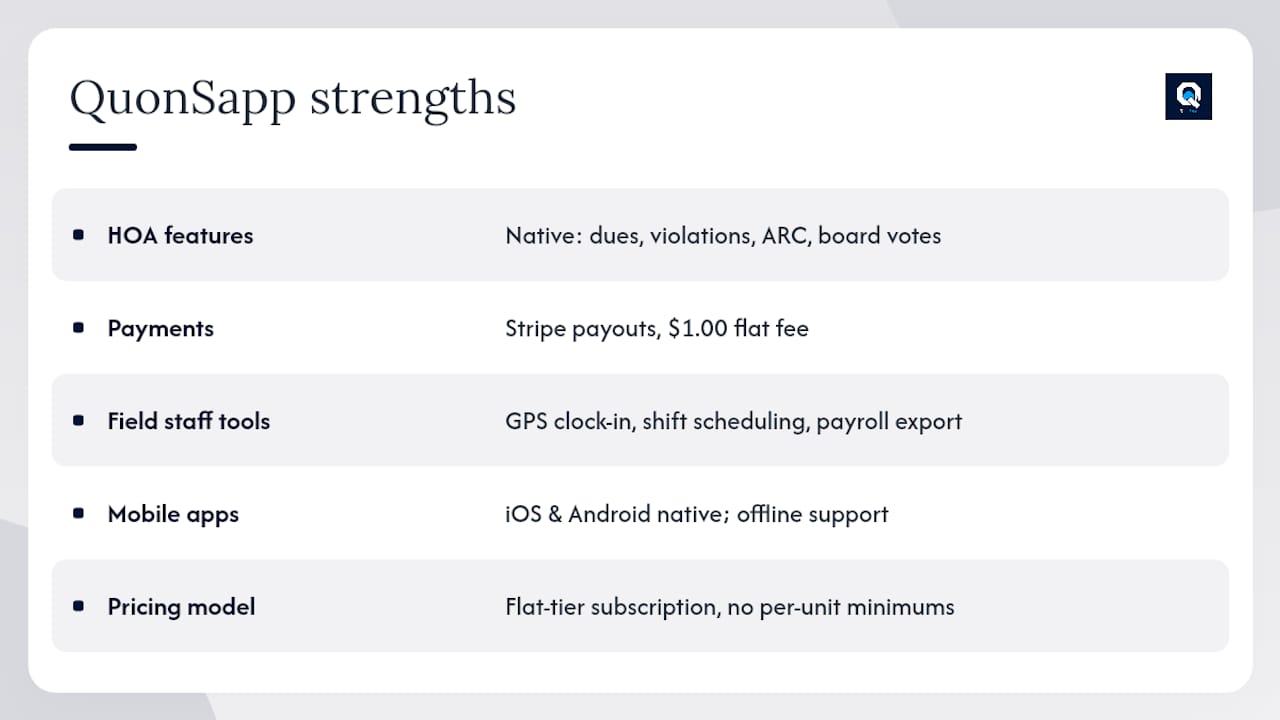
If your portfolio includes HOA communities, on-site staff, or multiple properties under one management umbrella, QuonSapp gives you the operational depth that general residential platforms don't. HOA dues, violation workflows, board votes, and ARC requests are native features — not add-ons. Resident payments go directly to your Stripe account with a $1.00 flat transaction fee. GPS clock-in, shift scheduling, and payroll export are built in for field teams. And the native iOS and Android apps work offline, so your maintenance staff stays connected even in low-signal areas.
The pricing model is flat-tier subscription with no per-unit minimums, so your monthly cost doesn't spike every time you add a unit. For a 200-unit HOA portfolio, that structure typically compares favorably against per-unit platforms once you account for the HOA workflow modules and staff tools you'd otherwise pay for separately.
To evaluate QuonSapp against your current platform, visit QuonSapp's property portfolio manager and request a demo. Ask specifically for a walkthrough of the HOA violation-to-fine workflow, a live Stripe payout demonstration, and a sample CSV import using your own data. Request migration references from managers who moved from AppFolio — their experience with data import and accounting reconciliation is the most honest signal you'll get.
Useful sources and further reading
The alternatives in this article were selected based on user-review signals from G2, Capterra, and Gartner Peer Insights, combined with pricing and fit data from CostBench, ITQlick, and BC Solutions. Reputation summaries draw on aggregated reviewer feedback; feature claims draw on vendor documentation. No platform was included based on paid placement.
- Top AppFolio Alternatives & Competitors 2026 | Gartner Peer Insights
- AppFolio competitors and alternatives | G2
- AppFolio Alternatives (2026): 4 Options Compared
- AppFolio Alternatives and Competitors | BC Solutions
- Top AppFolio Competitors in 2026 | ITQlick
- Re-Leased reviews | Capterra
- Re-Leased reviews | G2
- AppFolio Competitors | Comparably