
These are ready-to-copy leasing email templates for every major stage of the leasing cycle, from the first inquiry reply through move-out and deposit disposition. Copy any template directly from this page, paste it into your email client or CRM, swap the bracketed placeholders for real data, and send. If your platform supports CSV or template imports, you can batch-load the full set in one session.
Quick start: Copy the template text, replace all
[BRACKETED]fields with your property details, and save each one as a named template in your CRM. Jump to the QuonSapp implementation section to see how to wire triggers and placeholders automatically.
One number worth keeping front of mind: responding quickly to an initial leasing inquiry can greatly improve lead-to-resident conversion rates. That single data point shapes the entire cadence in this guide.
What you'll find here:
- Copy-paste templates for every leasing stage (inquiry through move-out)
- Subject-line formulas and CTA examples
- Personalization placeholders and segmentation guidance
- Timing and cadence table
- KPIs to track and A/B test ideas
- Step-by-step CRM automation checklist
- A Fair Housing compliance reminder woven into screening templates
Table of Contents
- What leasing email templates cover every stage?
- Applications and screening templates
- Tour confirmation and follow-up email templates
- Move-in and welcome templates
- Rent reminder and late-payment templates
- Renewal and retention templates
- Maintenance and service communication templates
- Move-out and deposit templates
- Referral, review, and resident engagement templates
- What makes subject lines and CTAs actually work?
- How to use placeholders and segmentation effectively
- When should you send each leasing email?
- Which KPIs tell you whether your templates are working?
- How to save and automate templates in your CRM
- How to automate these templates in QuonSapp
- Key Takeaways
- Why templates without automation are only half the answer
- QuonSapp puts these templates to work automatically
- Useful sources and references
What leasing email templates cover every stage?
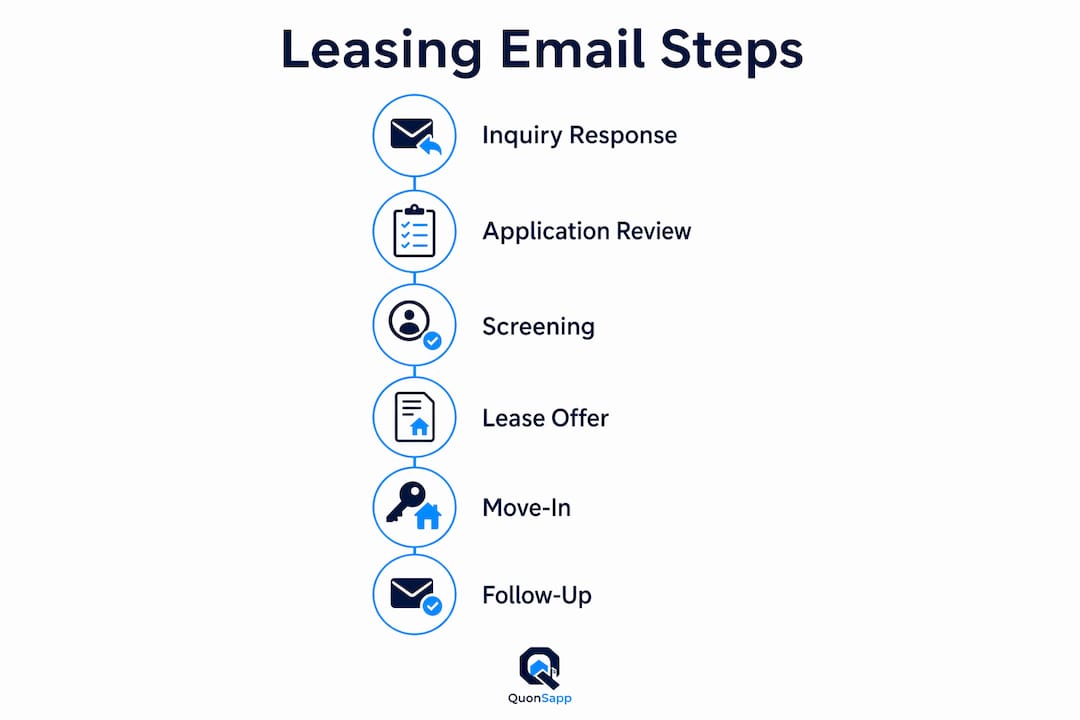
A complete property management email template library maps to ten leasing stages. The highest-impact categories for conversion are the first three: inquiry auto-reply, tour confirmation, and post-tour follow-up. Get those three right before building out the rest.
- Inquiry & applications — auto-reply, application received, screening request
- Tour & follow-up — confirmation, 24-hour reminder, post-tour thank-you + apply CTA
- Move-in & welcome — logistics checklist, portal setup, welcome message
- Rent reminders — friendly reminder, second notice, late-fee notice
- Maintenance — work-order receipt, scheduling, completion confirmation
- Renewals & retention — renewal offer, early-bird incentive, non-renewal survey
- Move-out & deposit — move-out checklist, inspection scheduling, deposit disposition
- Referrals & reviews — referral incentive, review request, resident engagement
Each template below is formatted as a ready-to-send snippet. Placeholders appear in [BRACKETS].
Applications and screening templates
Template 1: Inquiry auto-reply
Subject: Your question about [PROPERTY NAME] — we got it
Hi
[FIRST NAME],Thanks for reaching out about
[UNIT TYPE]at[PROPERTY NAME]. We have availability and would love to show you around.To schedule a tour, reply to this email or click here:
[TOUR BOOKING LINK]We'll confirm your time within the hour.
[YOUR NAME],[PROPERTY NAME]
Template 2: Application received
Subject: We received your application — here's what's next
Hi
[FIRST NAME],Your application for
[UNIT TYPE]at[PROPERTY NAME]is in. We'll review it within[X BUSINESS DAYS]and follow up with next steps.Questions? Reply here or call
[PHONE NUMBER].
[YOUR NAME]
Subject-line options:
- "Your application for
[PROPERTY NAME]is confirmed" - "Next steps for your
[UNIT TYPE]application"
Fair Housing reminder: Keep all screening criteria objective and applied consistently. Avoid language tied to race, national origin, familial status, religion, sex, disability, or color in any template. Use behavioral or transaction fields (application date, unit type, income threshold) rather than demographic details.
Pro Tip: Set your inquiry auto-reply to fire within 60 seconds of form submission using a CRM trigger. Manual replies sent hours later lose prospects to competitors who respond faster.
Tour confirmation and follow-up email templates
A three-message sequence converts more tours into applications than a single follow-up. Each message should add new, specific value rather than repeating "just checking in."
- Tour confirmation (sent immediately after scheduling)
- 24-hour reminder (sent the day before the tour)
- Post-tour thank-you + apply CTA (sent within 4 hours of the tour)
Message 1: Tour confirmation
Subject: Your tour at [PROPERTY NAME] is confirmed — [DATE] at [TIME]
Hi
[FIRST NAME],You're confirmed for a tour of
[UNIT TYPE]at[PROPERTY NAME]on[DATE]at[TIME].Address:
[ADDRESS]Parking:[PARKING INSTRUCTIONS]Contact on arrival:[LEASING AGENT NAME],[PHONE]See you then!
Message 2: 24-hour reminder
Subject: See you tomorrow at [TIME] — [PROPERTY NAME]
Hi
[FIRST NAME],Quick reminder: your tour is tomorrow at
[TIME]. If anything changes, reply here and we'll find a new time.One thing to check out when you arrive:
[SPECIFIC AMENITY OR FEATURE].
Message 3: Post-tour thank-you
Subject: Thanks for visiting — ready to apply?
Hi
[FIRST NAME],Great meeting you today. The
[UNIT TYPE]you toured is still available, and applications take about 10 minutes online.Apply here:
[APPLICATION LINK]If you have questions before applying, I'm happy to answer them — just reply.
Toured but not applied (follow-up sequence)
Send this 48 hours after the post-tour message if no application has come in.
Subject: Your dream apartment at [PROPERTY NAME] is still available
Hi
[FIRST NAME],The
[UNIT TYPE]you toured is still open. We've had a few inquiries, so availability may change soon.
[APPLICATION LINK]— takes about 10 minutes.
Cold lead re-engagement
Subject: Exclusive invitation to rediscover [PROPERTY NAME]
Hi
[FIRST NAME],It's been a while since we connected. We have a
[UNIT TYPE]available that matches what you were looking for —[SPECIFIC FEATURE FROM INITIAL INQUIRY].Want to schedule a fresh tour?
[TOUR BOOKING LINK]
Resident360 recommends spacing follow-ups at 4–48 hours and anchoring each message to a specific piece of new value, not a generic check-in.
Pro Tip: For the cold lead template, pull the prospect's original unit preference from your CRM and insert it as a personalization field. A message that references a specific feature converts better than one that reads like a broadcast.
Move-in and welcome templates
Move-in logistics checklist email
Subject: Your move-in details for [DATE] at [PROPERTY NAME]
Hi
[FIRST NAME],Here's everything you need for move-in day:
- Move-in date/time:
[DATE]at[TIME]- Key pickup:
[LOCATION]— bring a valid photo ID- Parking during move-in:
[PARKING INSTRUCTIONS]- Utilities to set up before arrival:
[UTILITY LIST]- Items to bring: signed lease, first month's rent, security deposit (if not already paid)
Questions? Reply here or call
[PHONE].
Welcome email
Subject: Welcome home, [FIRST NAME]!
Hi
[FIRST NAME],Welcome to
[PROPERTY NAME]. Your resident portal is live at[PORTAL LINK]— you can pay rent, submit maintenance requests, and access your lease documents there.A few things to bookmark:
- Emergency maintenance:
[EMERGENCY CONTACT]- Trash/recycling schedule:
[SCHEDULE]- Amenity booking:
[BOOKING LINK]We're glad you're here.
Rent reminder and late-payment templates
A three-stage sequence keeps communication professional without damaging the tenant relationship.
- Friendly reminder (3–5 days before due date)
- Second notice (due date or 1 day after)
- Late-fee notice (per your lease terms, typically 3–5 days after due date)
Stage 1: Friendly reminder
Subject: Rent due [DATE] — pay online in 2 minutes
Hi
[FIRST NAME],A quick heads-up: rent of
[$AMOUNT]is due on[DATE]. Pay online here:[PAYMENT LINK]Already sent it? Ignore this message.
Stage 2: Second notice
Subject: Rent for [MONTH] is now due — [PROPERTY NAME]
Hi
[FIRST NAME],Your rent of
[$AMOUNT]was due on[DATE]. Please pay at your earliest convenience to avoid a late fee.Pay now:
[PAYMENT LINK]If you're experiencing a hardship, reply and let's talk through options.
Stage 3: Late-fee notice
Subject: Late fee applied — account balance for [UNIT]
Hi
[FIRST NAME],Per your lease, a late fee of
[$AMOUNT]has been added to your account. Your current balance is[$TOTAL].Pay here:
[PAYMENT LINK]If you believe this is an error, contact us at
[CONTACT INFO].
For online rent payment setups, embed the direct payment link in every stage rather than asking residents to log in and navigate.
Tone note: Stage 1 and 2 should feel helpful, not punitive. Stage 3 is factual and firm. Never threaten legal action in a template without confirming the language with a local attorney.
Renewal and retention templates
Start renewal outreach 90 days before lease expiration. Most residents decide within 30 days of receiving the first offer.
- Initial renewal offer (90 days out)
- Early-bird incentive follow-up (60 days out, if no response)
- Final notice / non-renewal survey (30 days out)
Template 1: Renewal offer
Subject: Your lease at [PROPERTY NAME] renews on [DATE] — here are your options
Hi
[FIRST NAME],Your lease expires on
[DATE]. We'd love to have you stay. Here are your renewal options:
- 12-month renewal:
[$AMOUNT]/month- Month-to-month:
[$AMOUNT]/monthReply by
[DEADLINE]to lock in your rate.
Template 2: Early-bird incentive
Subject: Renew by [DATE] and get [INCENTIVE]
Hi
[FIRST NAME],We haven't heard back about your renewal yet. Residents who sign by
[DATE]receive[INCENTIVE — e.g., one month at current rate, $100 rent credit, or free parking upgrade].Ready to renew?
[RENEWAL LINK]
Template 3: Non-renewal survey
Subject: Sorry to see you go — one quick question
Hi
[FIRST NAME],We understand you won't be renewing. Before you go, would you take 60 seconds to tell us why? Your feedback helps us improve.
[SURVEY LINK]Thank you for being a resident at
[PROPERTY NAME].
Maintenance and service communication templates
Asking for one photo and two available time slots in the intake message cuts triage time significantly and speeds vendor assignment.

Work-order intake
Subject: Maintenance request received — [UNIT NUMBER]
Hi
[FIRST NAME],We received your maintenance request for
[ISSUE DESCRIPTION]. To get this resolved quickly, please reply with:
- One photo of the issue
- Two time slots when we can access the unit (e.g., Tuesday 9 AM–12 PM, Wednesday 1–4 PM)
We'll confirm your appointment within
[X HOURS].
Scheduling confirmation
Subject: Maintenance scheduled for [DATE] at [TIME]
Hi
[FIRST NAME],Your maintenance visit is confirmed for
[DATE]at[TIME].[TECHNICIAN/VENDOR NAME]will handle the repair.If you need to reschedule, reply here at least
[X HOURS]in advance.
Completion confirmation
Subject: Maintenance complete — how did we do?
Hi
[FIRST NAME],The work order for
[ISSUE]at[UNIT]has been completed. If anything looks off, reply and we'll follow up right away.How was the experience?
[FEEDBACK LINK]
Pro Tip: Attach the "before" photo from the intake message to the completion confirmation. Residents who see both photos are far less likely to dispute whether the repair was done.
Move-out and deposit templates
Move-out checklist email
Subject: Move-out instructions for [DATE] — [PROPERTY NAME]
Hi
[FIRST NAME],Your move-out date is
[DATE]. Here's what to do before you leave:
- Clean all appliances, fixtures, and surfaces
- Remove all personal belongings
- Take final meter readings for
[UTILITIES]- Drop keys at
[LOCATION]by[TIME]- Leave forwarding address for deposit return
We'll conduct a move-out inspection on
[DATE]at[TIME].
Deposit disposition notice
Subject: Security deposit update for [UNIT] — [PROPERTY NAME]
Hi
[FIRST NAME],Your security deposit of
[$AMOUNT]is being processed. Per your lease and applicable state law, you will receive a written itemization and any refund within[STATE-REQUIRED TIMEFRAME]of your move-out date.Refund will be sent to:
[FORWARDING ADDRESS ON FILE]
Compliance note: Document unit condition with timestamped photos at both move-in and move-out. Most states require deposit disposition within 14–30 days; confirm your state's deadline and include it in the template before sending.
Referral, review, and resident engagement templates
Referral email
Subject: Know someone looking? Earn [INCENTIVE] at [PROPERTY NAME]
Hi
[FIRST NAME],If you know someone who'd love living here, send them our way. When they sign a lease, you'll receive
[INCENTIVE — e.g., $200 rent credit].Share this link:
[REFERRAL LINK]Thanks for spreading the word!
Review request
Subject: 60 seconds to share your experience at [PROPERTY NAME]
Hi
[FIRST NAME],We'd love to hear what you think. A quick review helps future residents find a great home.
Leave a review here (one tap):
[REVIEW LINK]Thank you!
Resident engagement (event/survey)
Subject: [EVENT NAME] at [PROPERTY NAME] — [DATE]
Hi
[FIRST NAME],We're hosting
[EVENT DESCRIPTION]on[DATE]at[TIME]in[LOCATION]. RSVP here:[RSVP LINK]Hope to see you there!
What makes subject lines and CTAs actually work?
Short, scannable templates with a single clear CTA consistently outperform longer, multi-ask emails in leasing follow-up. Every template above follows this principle.
High-performing subject-line formulas:
- Specific + time-bound: "Your
[UNIT TYPE]at[PROPERTY NAME]is still available — apply by[DATE]" - Personalized: "
[FIRST NAME], your tour is tomorrow at[TIME]" - Action-oriented: "Pay rent in 2 minutes — due
[DATE]" - Curiosity + urgency: "One thing we forgot to mention during your tour"
CTA best practices:
- One CTA per email. Multiple links split attention and reduce clicks.
- Use a verb: "Apply Now," "Schedule a Tour," "Pay Rent," "Leave a Review."
- Place the CTA above the fold on mobile (within the first 3–4 lines of body text).
- Button CTAs outperform plain text links for primary actions.
Preview-text examples:
- "Takes 10 minutes — apply before the unit is gone."
- "Your tour is confirmed. Here's what to bring."
- "Late fee applies after
[DATE]— pay now to avoid it."
Statistic callout: Responding to a leasing inquiry within one minute can improve lead-to-resident conversion by up to 391%. Your subject line gets the open; your response time determines whether the lead converts.
Pro Tip: Test two subject lines on the same template by splitting your list 50/50. Run the test for two weeks, pick the winner, and move on. Small improvements compound fast across a full leasing season.
How to use placeholders and segmentation effectively
Placeholders tied to behavioral or transaction data reduce Fair Housing risk while keeping messages relevant. Prefer fields like tour date, unit type, and application status over any demographic detail.
Useful placeholders:
[FIRST NAME]— always include; "Hi there" kills open rates[UNIT TYPE]— studio, 1BR, 2BR; pulls from CRM unit interest field[TOUR DATE]/[TOUR TIME]— from appointment record[MUST-HAVE FEATURE]— from initial inquiry notes (e.g., "pet-friendly," "in-unit laundry")[LEASE END DATE]— from lease record; drives renewal timing[PAYMENT LINK]— direct URL to resident's invoice
Fallback text examples:
- If
[FIRST NAME]is blank: use "Hi there" or "Hello" - If
[UNIT TYPE]is blank: use "your preferred unit" - If
[TOUR DATE]is blank: suppress the tour-specific template entirely rather than sending a broken message
Segmentation buckets:
- New inquiry — received in last 24 hours; send auto-reply immediately
- Toured, not applied — toured within last 7 days; send 48-hour follow-up sequence
- Applied — application in review; send status update
- Move-in within 30 days — send logistics checklist and welcome sequence
- Cold lead — no engagement in 14+ days; send re-engagement template with new value
AI-augmented templates can pull live pricing and availability into placeholders automatically, keeping messages accurate without manual updates.
When should you send each leasing email?
Timing matters as much as copy. A well-written template sent 72 hours late loses to a mediocre one sent within the hour.
| Template | Ideal send time | Follow-up cadence |
|---|---|---|
| Inquiry auto-reply | Within 1 minute of inquiry | None; triggers tour confirmation |
| Tour confirmation | Immediately after scheduling | 24-hour reminder |
| Post-tour thank-you | Within 4 hours of tour | 48-hour follow-up if no application |
| Toured, not applied | 48 hours post-tour | One more at 7 days; then cold sequence |
| Rent reminder (friendly) | 3–5 days before due date | Second notice on due date |
| Late-fee notice | Per lease terms (typically 3–5 days after due) | None; escalate per policy |
| Renewal offer | 90 days before lease end | Follow-up at 60 days; final at 30 days |
| Move-out checklist | 30 days before move-out | Reminder 7 days before |
Statistic callout: Follow-up emails every 48 hours represent an effective cadence for post-tour sequences. Space them out further and you lose momentum; compress them and you risk unsubscribes.
Stop conditions: Always stop automated follow-ups the moment a prospect replies, applies, or books a tour. Continuing to send after engagement is the fastest way to damage a relationship you just built.
Which KPIs tell you whether your templates are working?
Track these five metrics per template, not just across your whole email list.
- Open rate — benchmarks vary by platform, but a subject-line problem shows up here first
- Reply rate — low reply rate on a post-tour follow-up usually means the CTA is buried or missing
- Click-to-schedule rate — measures how many opens result in a tour booking
- Application rate — percentage of toured prospects who submit an application within 7 days
- Lease conversion rate — applications that result in a signed lease
Diagnosing low performance:
- Low open rate: test a new subject line; check send time
- Low reply rate: simplify the CTA; move it higher in the email
- Low application rate: check that the application link works and loads fast on mobile
- Low lease conversion: the problem may be in the application process, not the email
Three A/B tests to run first:
- Subject line: personalized name vs. property name
- CTA placement: above the fold vs. end of email
- Send time: morning (8–10 AM) vs. early evening (5–7 PM)
Run each test for two weeks minimum before drawing conclusions.
Pro Tip: Tag every template with a UTM parameter on the CTA link. That way your analytics platform shows exactly which template drove the tour booking or application, not just which email campaign.
How to save and automate templates in your CRM
A step-by-step checklist for getting templates live and triggered in any property-management CRM or email tool.
- Name every template using a consistent convention:
[Stage]_[Action]_[Audience](e.g.,Tour_Confirmation_NewProspect). - Add placeholders using your platform's merge-field syntax (e.g.,
{{first_name}}in most CRMs,[FIRST NAME]in manual tools). - Set fallback values for every placeholder so blank fields never produce broken messages.
- Create triggers for each stage:
- New inquiry submitted → fire inquiry auto-reply
- Tour appointment created → fire tour confirmation
- Application received → fire application-received template
- Lease end date within 90 days → fire renewal offer
- Tag templates by stage and audience for easy filtering (e.g., tag:
prospect,resident,renewal). - Test each trigger with a dummy record before going live.
Trigger examples by leasing stage:
- New inquiry form submission → inquiry auto-reply (within 60 seconds)
- Tour scheduled → confirmation email + 24-hour reminder queued
- Application status changed to "received" → application-received email
- Lease end date = today + 90 days → renewal offer email
- Payment overdue by 1 day → second-notice email
Digitizing your property workflows is the prerequisite for any of this automation to work reliably. Manual processes break trigger chains.
How to automate these templates in QuonSapp
QuonSapp maps directly to the template workflow above. Here's a concrete implementation path.
Setup steps:
- Open the Document Generator and paste each template into a named template slot.
- Map placeholders to resident profile fields:
[FIRST NAME]→ Contact Name,[UNIT TYPE]→ Unit field,[LEASE END DATE]→ Lease Tracking end date. - In Appointments, create tour-scheduled triggers that fire the confirmation and 24-hour reminder automatically.
- Use Resident Applications to trigger the application-received template when a new application is submitted.
- Set Lease Tracking renewal alerts to fire the 90-day renewal offer template.
- In Invoice Management, attach the payment link to rent reminder templates and configure the overdue alert to trigger Stage 2 and Stage 3 notices.
- Connect Work Order Creation to the maintenance intake template so residents receive an auto-reply with photo and time-slot prompts the moment they submit a request.
Sample workflow: inquiry to lease signed
- Prospect submits inquiry → auto-reply fires within 60 seconds
- Prospect books tour via Appointments → confirmation + reminder sent automatically
- Tour completed → post-tour thank-you fires within 4 hours
- No application after 48 hours → "toured but not applied" follow-up fires
- Application submitted → application-received template fires; background check workflow begins
- Lease signed → move-in checklist and welcome email fire; resident portal access granted
QuonSapp features used in this workflow:
- Resident Applications (online application + background/credit check)
- Appointments (tour scheduling and move-in walkthroughs)
- Lease Tracking (renewal alerts, move-out tracking)
- Document Generator (template creation and generation)
- Invoice Management + Resident Payments (payment links in rent reminders)
- Work Order Creation (maintenance intake with photo prompts)
- Resident Profiles (placeholder data source for all merge fields)
- Announcements & Messaging (broadcast templates for renewals and events)
Pro Tip: Use QuonSapp's Audit Log to verify that every automated message fired correctly. If a trigger misfired or a placeholder returned blank, the log shows exactly when and why, so you can fix it before it affects the next prospect.

Key Takeaways
A complete set of leasing email templates, triggered automatically and personalized with behavioral data, is the single most reliable way to improve conversion at every stage of the leasing cycle.
| Point | Details |
|---|---|
| Respond within one minute | Replying to a leasing inquiry within one minute can improve lead-to-resident conversion by up to 391%. |
| Start with three core templates | An inquiry auto-reply, tour confirmation, and renewal offer deliver measurable impact before you build the full library. |
| Use behavioral placeholders | Tie merge fields to tour date, unit type, and application status to keep messages relevant and reduce Fair Housing risk. |
| Follow a 48-hour cadence | Space post-tour follow-ups at 48-hour intervals and stop all automated sequences the moment a prospect responds. |
| Automate in QuonSapp | QuonSapp's Document Generator, Lease Tracking, and Resident Applications map directly to the trigger workflow described above. |
Why templates without automation are only half the answer
Most property managers I talk to have templates. What they don't have is a system that fires those templates at the right moment without anyone remembering to hit send. That gap is where leads fall through.
The 391% conversion improvement tied to the one-minute response rule is not a marketing claim. It reflects a simple reality: prospects shopping for an apartment are often contacting multiple properties at once. The first manager to respond with something useful, not a generic "thanks for your interest," wins the showing. A template sitting in a Google Doc does nothing at 9 PM on a Sunday when a prospect submits an inquiry.
The other mistake I see often is treating follow-up as a courtesy rather than a conversion tool. Sending the same "just checking in" message three times is not follow-up. Each message in a sequence needs to add something new: a specific amenity the prospect mentioned, a current availability update, a neighborhood detail they haven't heard yet. That's what drip-style follow-up actually means in practice.
Templates also protect you legally. Consistent, documented messaging across every prospect interaction is one of the clearest ways to demonstrate Fair Housing compliance. When every prospect in the same segment receives the same language, there's no ambiguity about differential treatment.
Build the templates. Wire the triggers. Then measure what changes.
QuonSapp puts these templates to work automatically
Property managers who build a template library and then rely on staff to send each message manually are solving half the problem. QuonSapp closes the other half by connecting your templates directly to the events that should trigger them: a new inquiry, a scheduled tour, a submitted application, a lease nearing its end.

With QuonSapp, your inquiry auto-reply fires in under a minute without anyone touching a keyboard. Renewal alerts trigger 90 days out from the lease end date stored in Lease Tracking. Maintenance intake templates prompt residents for photos and time slots automatically. Rent reminders carry a live payment link straight to your Stripe account. Every message is logged in the Audit Log, so you always know what was sent, when, and to whom.
The result: faster responses, fewer missed follow-ups, and a leasing process that runs consistently whether your team is in the office or in the field. Start with QuonSapp to see how the full template workflow maps to your portfolio.
Useful sources and references
- Drive Prospects from Interest to Lease: A Four-Step Email Guide — Journey Matters; source for the one-minute response rule and 391% conversion figure, and the 48-hour follow-up cadence recommendation.
- How To Properly Follow Up With a Prospect That Just Toured Your Community — Resident360; drip-model guidance for post-tour sequences and timing.
- 10 AI Leasing Email Templates That Convert in 2026 — Haven AI; AI-augmented personalization using live property data and Fair Housing checklist.
- Leasing Email Templates — Publicate; template design best practices including mobile responsiveness, analytics, and team collaboration.
- 5 Great Leasing Follow Up Email Templates To Copy & Paste — Flodesk; subject-line and CTA best practices for leasing follow-up.
- Multifamily email templates for leasing follow-up — Respage; segmented templates by prospect status including toured, cold, and move-in within 30 days.